Array Flatten in JavaScript
1. What is a nested array?
Imagine you have a box of items. Simple enough. Now imagine some of those items are themselves boxes — and those inner boxes also contain items. That is exactly what a nested array is: an array where some (or all) of the elements are themselves arrays.
In JavaScript, this looks like:
// A flat array — all items are simple values
const flat = [1, 2, 3, 4, 5];

// A nested array — some items are themselves arrays
const nested = [1, [2, 3], [4, [5, 6]]];
The outermost array [1, [2, 3], [4, [5, 6]]] has three elements: the number 1, the array [2, 3], and the array [4, [5, 6]]. That last one goes even deeper — [5, 6] is nested inside [4, ...], which is itself nested inside the outermost array. This is called a depth of 2.
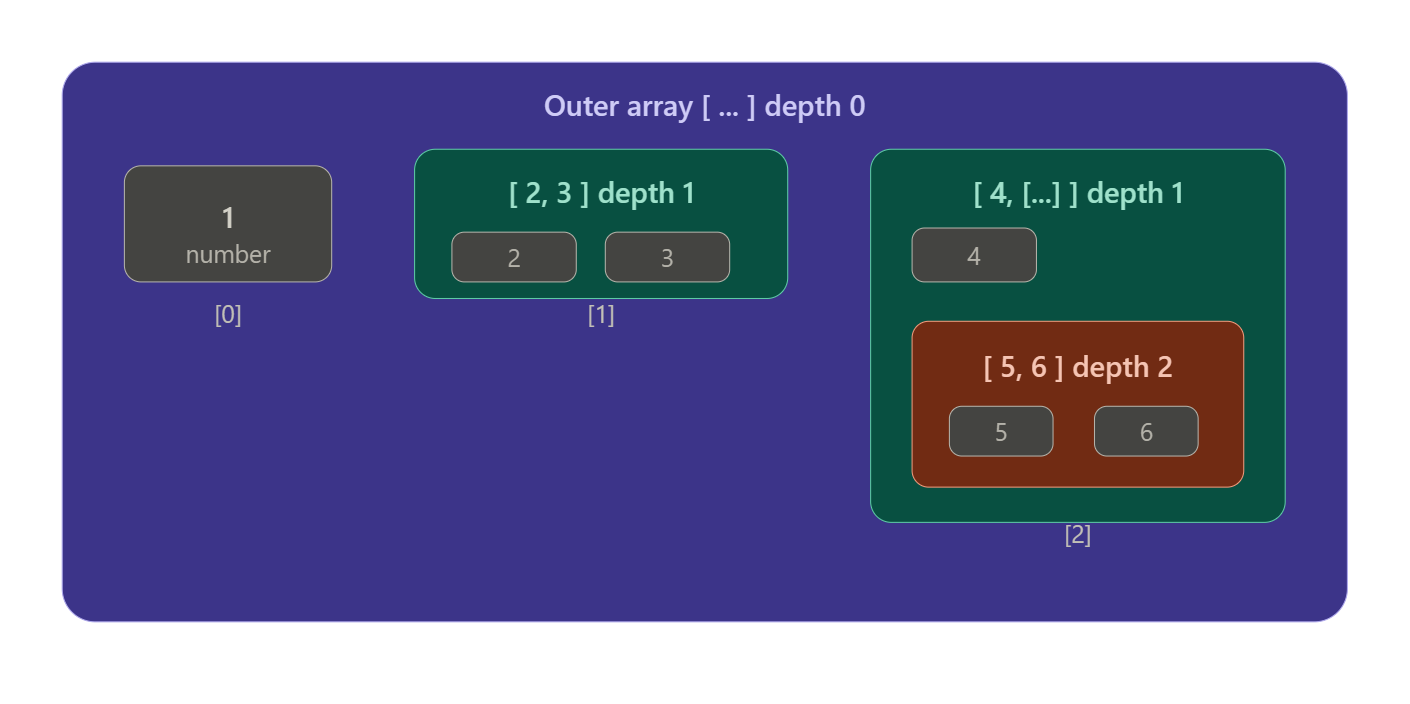
Notice the three layers of containment: the outer purple frame is depth 0, the teal boxes are depth 1, and the coral box is depth 2. Every number lives inside at least one "box," and some numbers (5 and 6) are inside three nested boxes simultaneously.
Why do nested arrays exist in real code?
Nested arrays model real-world structures that are naturally hierarchical. A spreadsheet is a good example — each row is an array of cells, and the whole spreadsheet is an array of rows:
js
const spreadsheet = [
  ["Name",  "Age", "City"],
  ["Alice", 30,    "Delhi"],
  ["Bob",   25,    "Mumbai"],
];

// Accessing "Alice" → row 1, column 0
console.log(spreadsheet[1][0]); // "Alice"
You'll also see nested arrays in game boards (a chess board is an 8×8 grid), tree data converted to arrays, and API responses where each item has sub-items.
What is flattening?
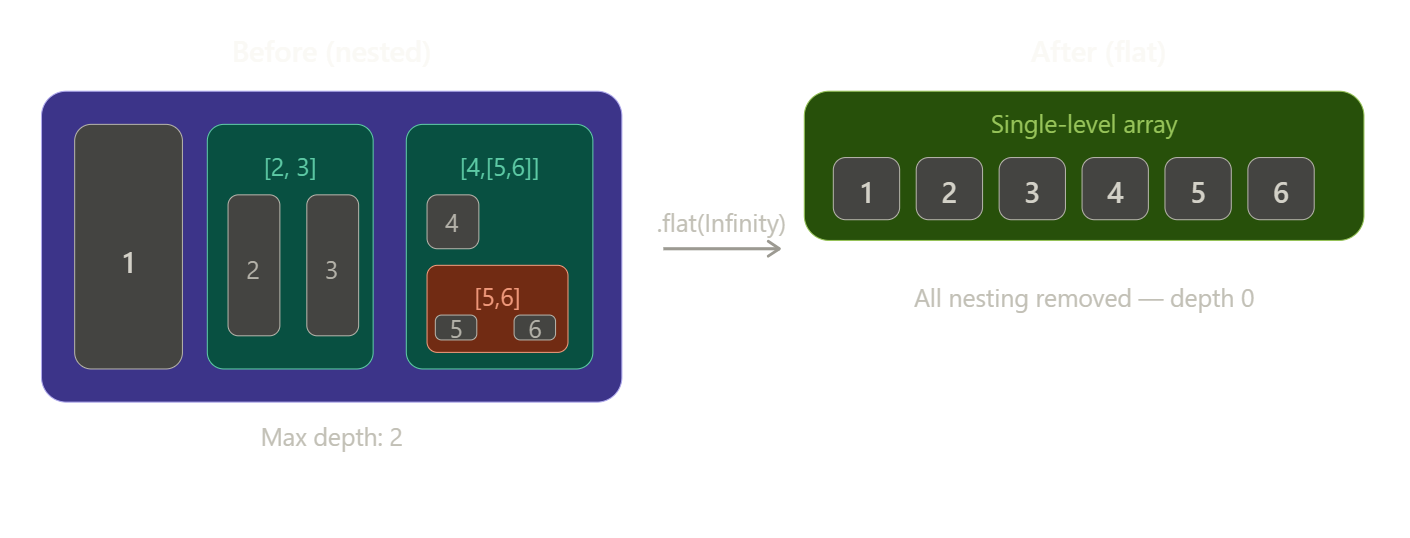
Flattening is the process of transforming a nested array into a single-level array — taking all those boxes-within-boxes and emptying everything out into one big flat list, in order.
const nested = [1, [2, 3], [4, [5, 6]]];
const flatResult = [1, 2, 3, 4, 5, 6]; // after full flatten
Step-by-step flattening: how does it actually work?
The core idea behind flattening is simple: walk through every element of the array. If an element is a plain value, keep it. If an element is itself an array, "open" it and walk through its elements the same way — and keep doing this recursively until you've visited every value, no matter how deeply buried.
Let's trace through [1, [2, 3], [4, [5, 6]]] step by step.
Step 1 — look at element [0]: it's 1. It's a plain number, so add it directly to the result. Result so far: [1].
Step 2 — look at element [1]: it's [2, 3]. It's an array, so open it and walk through its contents. First we find 2 (plain value, add it), then 3 (plain value, add it). Result so far: [1, 2, 3].
Step 3 — look at element [2]: it's [4, [5, 6]]. It's an array, so open it. First we find 4 (plain value, add it). Then we find [5, 6] — another array! Open it too. We find 5 and 6, both plain values. Add them in order. Result so far: [1, 2, 3, 4, 5, 6].
How to flatten in JavaScript
JavaScript gives you two primary tools for flattening arrays.
Using Array.flat(depth) is the simplest approach. You call .flat() on your array and pass a depth — how many levels of nesting to remove. If you're not sure how deep your array goes, pass Infinity to remove all levels.
const nested = [1, [2, 3], [4, [5, 6]]];

// Flatten only one level deep
nested.flat(1);       // [1, 2, 3, 4, [5, 6]]  ← [5,6] still nested!

// Flatten all levels (fully flatten)
nested.flat(Infinity); // [1, 2, 3, 4, 5, 6]  ← completely flat
The depth argument is a trap worth thinking about carefully. When depth is 1, .flat() opens each top-level array by one layer but goes no deeper. Notice that [5, 6] survives because it's two levels deep. You need Infinity — or the exact right number — to reach everything.
Writing your own recursive flatten is a great problem-solving exercise and also tells you what's really happening under the hood:
function flatten(arr) {
  const result = [];

  for (const item of arr) {
    if (Array.isArray(item)) {
      // Item is an array — recurse into it
      // and spread all its results into ours
      result.push(...flatten(item));
    } else {
      // Item is a plain value — add it directly
      result.push(item);
    }
  }

  return result;
}

flatten([1, [2, 3], [4, [5, 6]]]); // [1, 2, 3, 4, 5, 6]
The key insight here is the if (Array.isArray(item)) check — this is your "is this a box?" test. If yes, recurse. If no, collect. Every recursive call works on a smaller sub-problem, and eventually every recursive call hits only plain values and returns.
Common gotchas to watch for
Understanding nested arrays also means knowing where confusion tends to creep in.
Forgetting that flat(1) doesn't go deep enough is extremely common. If your data can be arbitrarily deep (like a response from an API), flat(1) will leave some arrays intact. Default to flat(Infinity) unless you have a reason to control the depth.
Confusing flat() with flatMap() is another source of bugs. flatMap() is a combination of map() followed by flat(1). It's useful when your mapping function itself returns arrays. For example:
// flatMap: map each word to its characters, then flatten one level
["hi", "there"].flatMap(word => word.split(""));
// ["h", "i", "t", "h", "e", "r", "e"]
Think of flatMap() as: "transform each item into a small array of new items, then stitch all those small arrays together into one list."
Not all nesting needs to be removed. If your nested array represents a table (rows and columns), flattening it would destroy the structure. The question to ask before flattening is: "Does the nesting carry meaning I need to preserve?" If rows in a spreadsheet are meaningful, keep them. If you just need all the values in sequence, flatten.
Putting it together: a practical example
Say you have a list of orders, and each order contains multiple item names. You want one flat list of all item names across every order:
const orders = [
  { items: ["apple", "banana"] },
  { items: ["carrot"] },
  { items: ["donut", "espresso", "fig"] },
];

// Extract the items arrays, then flatten the result
const allItems = orders.map(order => order.items).flat();
// ["apple", "banana", "carrot", "donut", "espresso", "fig"]

// Or use flatMap for the same result more concisely
const allItems2 = orders.flatMap(order => order.items);
// ["apple", "banana", "carrot", "donut", "espresso", "fig"]
The mental model is always the same: identify the nesting, decide which tool fits the depth, and trace through a small example by hand before running the code. Once you can see the boxes-within-boxes clearly, flattening becomes a natural reflex.
2. Why flattening arrays is useful
If you've ever stared at a deeply nested array and thought "I just need all the values in one place" — you've already felt the problem that flattening solves. But flattening isn't just a convenience trick. It's a mental model for recognising when structure is getting in the way of computation, and knowing how to dissolve it cleanly.
The real problem: structure that fights your logic
Nested arrays arise naturally. They model the world well — orders contain items, playlists contain songs, classrooms contain students. That hierarchical shape is great for representing data. The trouble starts the moment you want to compute something across all of it.
Say you have sales data grouped by region, and you want to find the highest single sale across every region. If your data looks like this:
js
const salesByRegion = [
  [340, 820, 150],   // North
  [990, 430],        // South
  [210, 670, 510],   // East
];
Finding the max with the array in its nested form is awkward. You'd have to loop through each region, then loop through each sale inside it, keeping track of a running maximum. But if the data were flat — just one long list of numbers — you could do it in a single elegant expression:
const allSales = salesByRegion.flat();
const highest = Math.max(...allSales); // 990
The nesting was useful for organising the data by region. But once you need to ask "what's the max across everything?", that organisation becomes friction. Flattening removes the friction.
This is the core idea worth internalising: nesting organises, flattening computes. You'll often want both, at different moments.
Seeing it structurally
Let's look at the shape of that transformation before going further. The nested form has three groups; the flat form has one sequence.
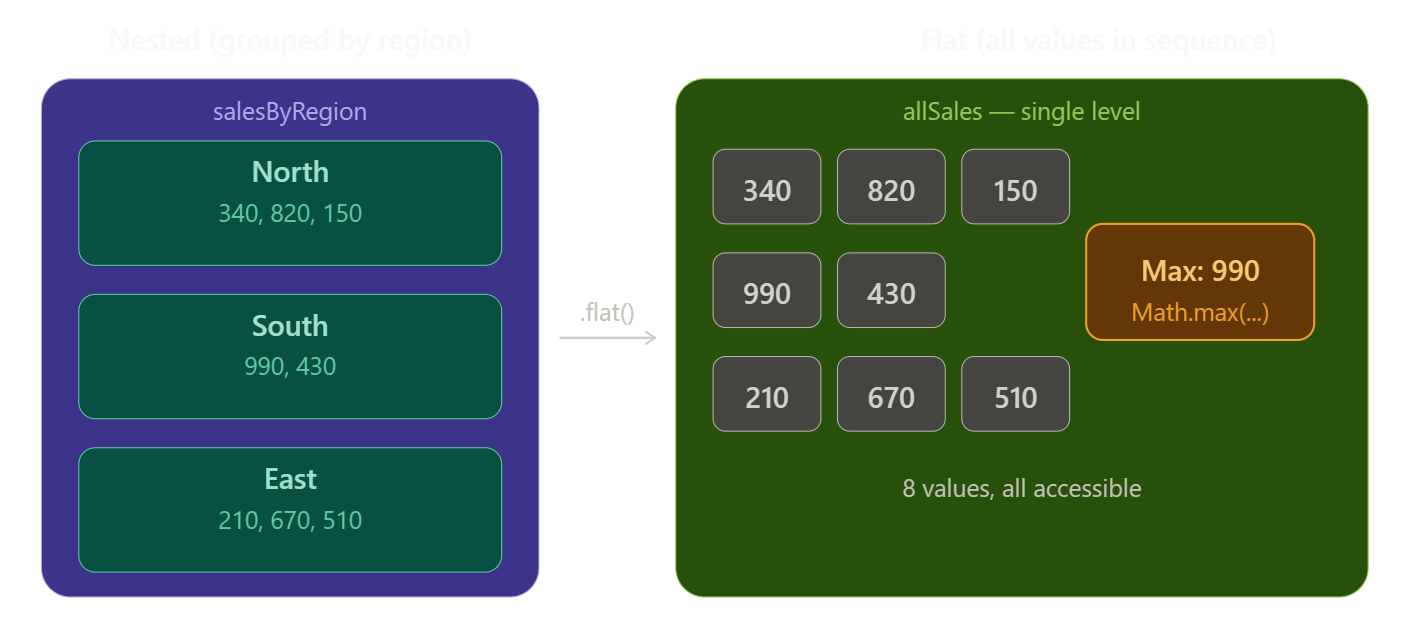
Notice how the amber "Max: 990" box on the right becomes possible only after the values are all in one reachable sequence. The groups were never wrong — they were just designed for a different job.
Four concrete situations where flattening earns its keep
Knowing the abstract idea is a start. But the real intuition builds when you see the pattern show up across different scenarios. Here are four common ones worth studying.
1. Aggregating data across groups
You just saw this with Math.max. The same pattern applies for summing, averaging, counting, sorting, or filtering. Any time you want to ask a question across all items regardless of which group they belong to, you flatten first, then compute.
const scores = [[72, 88, 91], [63, 77], [95, 84, 60]];

// Total of all scores — flatten, then reduce
const total = scores.flat().reduce((sum, n) => sum + n, 0); // 630

// Average
const avg = total / scores.flat().length; // 78.75

// All passing scores (≥ 70)
const passing = scores.flat().filter(s => s >= 70); // [72, 88, 91, 77, 95, 84]
The key habit to build is noticing the moment when the grouping becomes irrelevant to your question. The instant you find yourself writing a nested for loop just to visit every value, that's your signal: flatten first.
2. Combining results from multiple sources
Imagine you have a function that searches a database and returns an array of results. You call it several times with different queries and collect the results in an array. Each call returns its own array, so you end up with an array of arrays:
const query1Results = ["user:alice", "user:bob"];
const query2Results = ["user:carol"];
const query3Results = ["user:dave", "user:eve", "user:frank"];

const allResults = [query1Results, query2Results, query3Results];
// [["user:alice", "user:bob"], ["user:carol"], ["user:dave", ...]]

// Flatten to work with the full result set as one list
const merged = allResults.flat();
// ["user:alice", "user:bob", "user:carol", "user:dave", "user:eve", "user:frank"]
This is especially common when you're using Promise.all to run multiple async requests and then process everything together.
3. The flatMap pattern — transform and collect
This one deserves special attention because it represents a distinct mental model: not just flattening existing data, but generating arrays during a mapping step and then stitching them into one result.
Consider this: you have a list of sentences, and you want a list of every individual word across all sentences.
const sentences = [
  "the cat sat",
  "on the mat",
  "by the door"
];

// map produces an array of arrays — not what we want
sentences.map(s => s.split(" "));
// [["the","cat","sat"], ["on","the","mat"], ["by","the","door"]]

// flatMap maps AND flattens in one step — exactly what we want
sentences.flatMap(s => s.split(" "));
// ["the", "cat", "sat", "on", "the", "mat", "by", "the", "door"]
The mental model for flatMap is: "for each item, produce a small collection of new items, then merge all those small collections into one big list." It comes up constantly in real code — expanding tags, generating pairs, parsing structured text, mapping one item to multiple output records.
4. Cleaning up API responses
APIs often return data in shapes that mirror their database structure, not your UI's needs. It's common to receive something like:
const apiResponse = {
  categories: [
    { name: "Fruits",      items: ["apple", "banana", "mango"] },
    { name: "Vegetables",  items: ["carrot", "peas"] },
    { name: "Grains",      items: ["rice", "oats", "wheat"] }
  ]
};
If you want to render a flat dropdown of all items, you need to extract and flatten:
const allItems = apiResponse.categories
  .map(cat => cat.items)   // [["apple","banana","mango"], ["carrot","peas"], [...]]
  .flat();                  // ["apple", "banana", "mango", "carrot", "peas", ...]

// Or the concise equivalent using flatMap:
const allItems2 = apiResponse.categories.flatMap(cat => cat.items);
This .map().flat() pattern — or its one-liner equivalent flatMap — is arguably the most common use of array flattening in real frontend and Node.js code.
The flatten transformation, step by step
Let's make the mechanics concrete by tracing through how [1, [2, 3], [4, [5, 6]]] gets flattened to [1, 2, 3, 4, 5, 6]. The algorithm visits elements one by one and asks a single question at each step: is this a plain value, or is it an array?
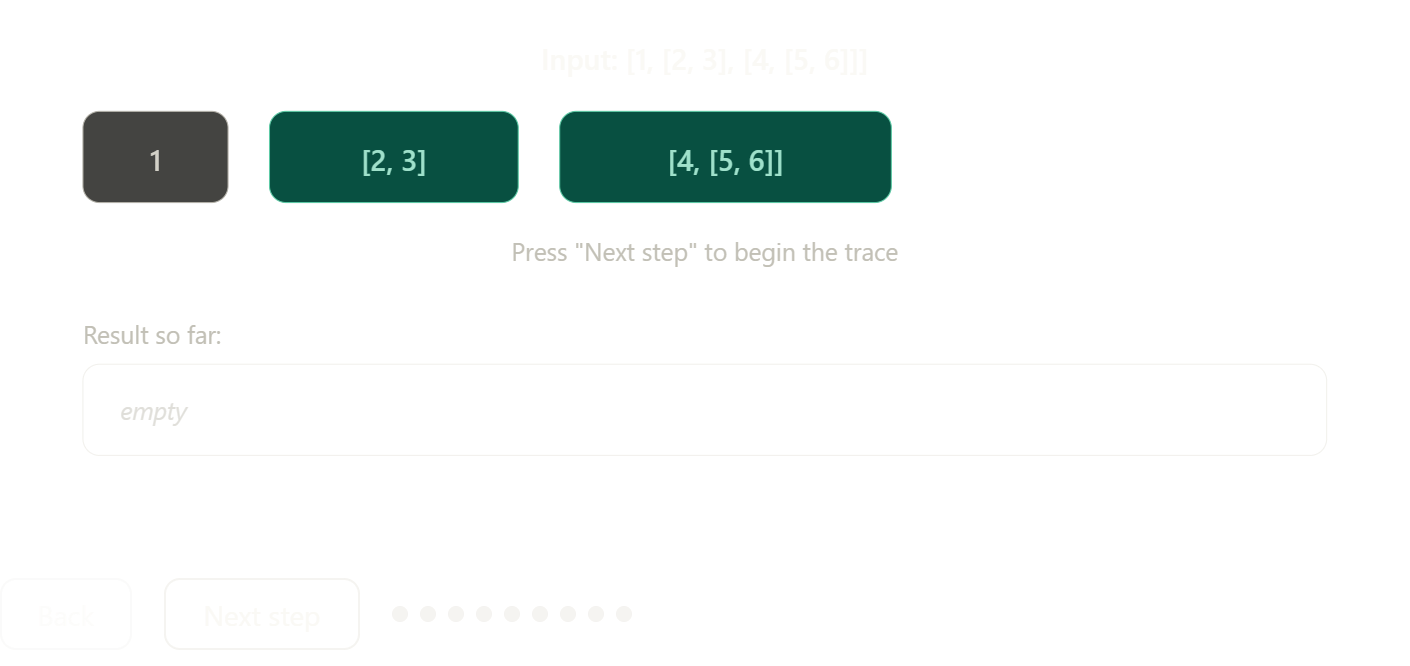
Step through it carefully — notice how the algorithm never "looks ahead." It simply asks one question at every value it encounters: array or not? That recursive clarity is what makes the pattern so reliable, even for structures with unpredictable depth.
When NOT to flatten
Knowing when to flatten is just as important as knowing how. Not all nesting is friction — sometimes it's load-bearing meaning that you should not destroy.
A grid or matrix should stay nested because the row structure is the data. [[1,2,3],[4,5,6],[7,8,9]] represents a 3×3 table; flattening it gives you [1,2,3,4,5,6,7,8,9] with no way to recover which values belonged to which row without knowing the original dimensions.
A tree (like a menu with sub-menus, or a file system) should stay nested because the hierarchy encodes relationships. Flattening it destroys the parent–child structure entirely.
The question to ask before flattening is always: "does the nesting encode meaning I'll need later?" If yes — preserve it. If no — flatten freely.
3. Concept of flattening arrays
Learning to flatten arrays is one of those moments in a developer's journey where a small idea quietly unlocks a much bigger way of thinking. On the surface, it looks like a utility — "just take nested stuff and make it flat." But underneath, it's a lesson in recognising structure, understanding recursion, and knowing when to simplify before you compute.
Start here: what does "nested" actually mean?
Before we can talk about flattening, we need to sit with the idea of nesting for a moment, because it's more intuitive than it might first appear.
Think about a filing cabinet. The cabinet itself is a container. Inside it are folders. Inside each folder are documents. Each document contains words. That's four levels of nesting — and we navigate structures like this every day without thinking about it.
In JavaScript, arrays work the same way. An array is just a container. And like a folder in a filing cabinet, it can hold anything — including other arrays. When an array holds other arrays as its elements, we call it a nested array.
// A flat array — every element is a plain value
const flat = [10, 20, 30, 40];

// A nested array — some elements are themselves arrays
const nested = [10, [20, 30], [40, [50, 60]]];
In the nested example above, nested[1] is not a number — it's the array [20, 30]. And nested[2] is [40, [50, 60]], which itself contains another array inside it. The outer array is at depth 0. The arrays inside it are at depth 1. The array inside those is at depth 2.
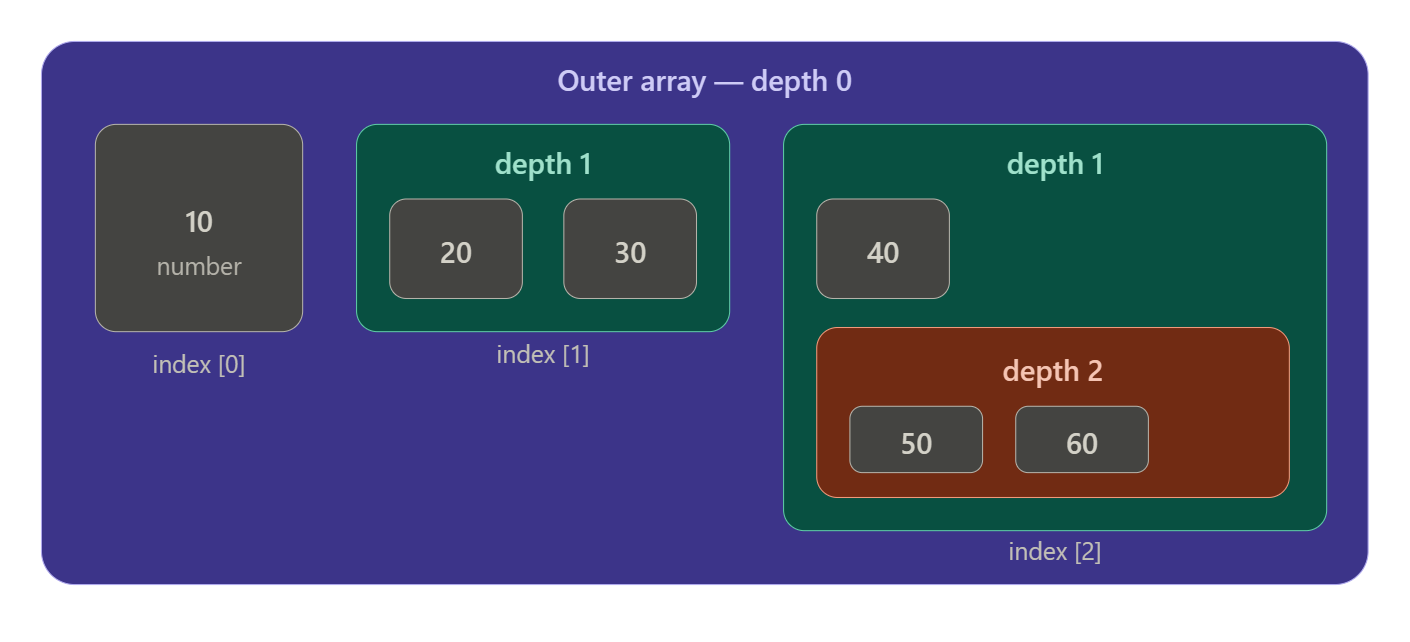
Each value lives exactly one level deeper than the array that contains it. The number 10 lives directly in the outer array (depth 0 → depth 1 transition for accessing it). The number 50 lives in an array inside an array inside the outer array — you have to go three levels deep to reach it.
What flattening means, precisely
Flattening is the act of taking a nested array and producing a new, single-level array that contains all the original values — in the same left-to-right order — but with all the intermediate containers removed.
It's worth saying that clearly: flattening does not change the values, it does not change their order, and it does not remove any values. It only removes the nesting. Every number that was buried inside some inner array ends up sitting directly in the result, side by side with every other number.
// Input — values at different depths
[10, [20, 30], [40, [50, 60]]]

// Output after full flatten — same values, same order, no nesting
[10, 20, 30, 40, 50, 60]
Think of it like unpacking all those folders in the filing cabinet, laying every document flat on a table in the same order you found them, and throwing the folders away. The documents haven't changed — only the containers are gone.
How the transformation works visually
It helps to see the before and after side by side, with the movement of values made explicit. The nested structure collapses leftward into a single horizontal sequence:
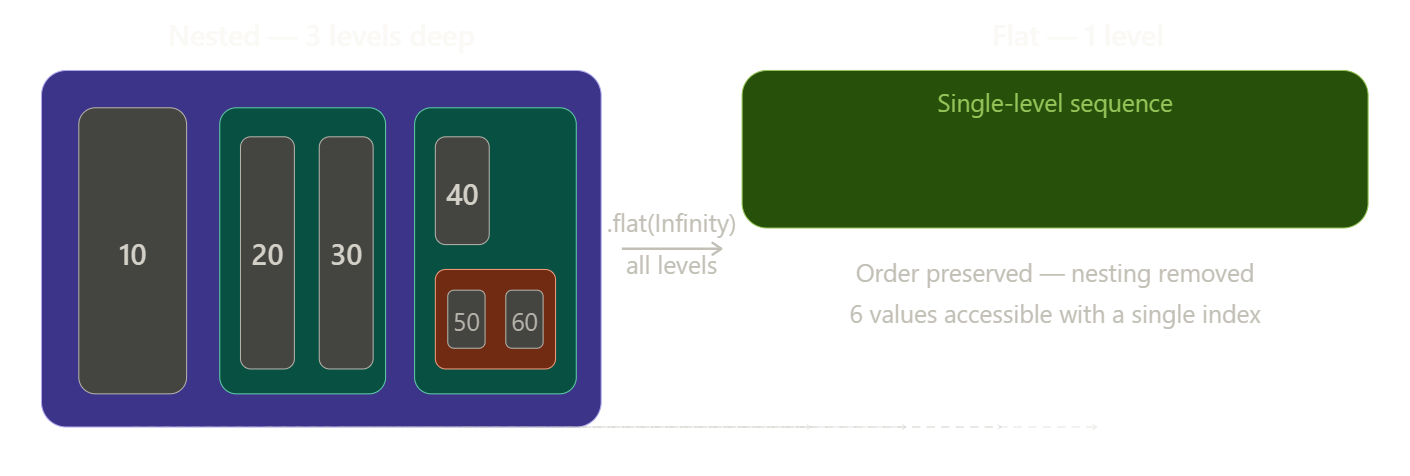
The dashed lines at the bottom show each value's journey from its nested home to its final position in the flat result. The left-to-right order is perfectly preserved — what changes is only the depth at which each value lives.
The algorithm behind flattening
Understanding how flattening works mechanically is important, because it reveals a fundamental pattern in programming: recursion.
The algorithm is short enough to state in two sentences. Walk through every element in the current array. If the element is a plain value, collect it. If the element is itself an array, apply the same process to it — recursively, going as deep as needed.
Let's trace through [10, [20, 30], [40, [50, 60]]] one decision at a time, so you can see the logic unfold:
The algorithm starts at the outermost array and looks at index [0]. It finds 10. That's a number, not an array, so it goes straight into the result. Result so far: [10].
Next it looks at index [1]. It finds [20, 30]. That's an array — so instead of collecting it as a single unit, the algorithm opens it up and starts walking through its contents. It finds 20 (a number — collect it), then 30 (a number — collect it). Result so far: [10, 20, 30].
Next it looks at index [2]. It finds [40, [50, 60]]. Another array — open it. First element inside: 40 (a number — collect it). Second element inside: [50, 60]. Another array — open it too. Inside: 50 (collect), then 60 (collect). Result: [10, 20, 30, 40, 50, 60].
Done. Every value found, every container discarded.
Here is that logic written as a recursive function, which mirrors the algorithm exactly:
function flatten(arr) {
  const result = [];

  for (const item of arr) {
    if (Array.isArray(item)) {
      // This item is a container — recurse into it.
      // Whatever comes back is a flat sub-list we can spread in.
      result.push(...flatten(item));
    } else {
      // This item is a plain value — collect it directly.
      result.push(item);
    }
  }

  return result;
}

flatten([10, [20, 30], [40, [50, 60]]]);
// → [10, 20, 30, 40, 50, 60]
The Array.isArray(item) check is the heart of the algorithm. It's the question the algorithm asks at every single element: "Are you a container or a value?" If you're a container, we go inside you. If you're a value, we keep you. That one binary decision, applied recursively, handles arrays of any depth.
Depth: the concept you can't skip
One subtlety that trips up a lot of learners is that flattening has a depth parameter. Not every flatten operation removes all nesting — sometimes you only want to go one level deep, and leave deeper nesting intact.
Consider this array:
const data = [1, [2, [3, [4]]]];
There are three levels of nesting here. .flat(1) removes only the outermost layer:
data.flat(1); // [1, 2, [3, [4]]]  — one level peeled off
data.flat(2); // [1, 2, 3, [4]]    — two levels peeled off
data.flat(3); // [1, 2, 3, 4]      — all nesting gone
data.flat(Infinity); // [1, 2, 3, 4]  — same, works for any depth
Think of depth as how many times you're willing to open a box. With flat(1), you open each outer box and collect what's inside — but if what's inside is another box, you leave it closed. With flat(Infinity), you keep opening boxes until there's nothing left to open.
The mental exercise worth doing here is this: before you call .flat(), ask yourself "how many layers of nesting does my data actually have, and how many do I want to remove?" For most real-world cases, you either want flat(1) (collapse one level) or flat(Infinity) (collapse everything). Choosing the wrong depth is one of the most common bugs with array flattening.
The built-in tools: .flat() and .flatMap()
JavaScript gives you two native methods, and understanding both is part of understanding the concept fully.
.flat(depth) is the direct tool. It takes an array, takes a depth (default is 1 if you omit it), and returns a new flattened array. It does not modify the original.
const nested = [[1, 2], [3, 4], [5, 6]];
nested.flat();       // [1, 2, 3, 4, 5, 6]
// nested is unchanged — flat() returns a new array
.flatMap(fn) is a combined operation: it first applies a mapping function to each element (like .map()), and then flattens the result by exactly one level. It's most useful when the transformation you're applying produces an array for each input item, and you want all those arrays merged into one.
// A practical example: split each sentence into words
const sentences = ["hello world", "foo bar baz"];
sentences.flatMap(s => s.split(" "));
// ["hello", "world", "foo", "bar", "baz"]

// Without flatMap, you'd get an array of arrays:
sentences.map(s => s.split(" "));
// [["hello", "world"], ["foo", "bar", "baz"]]
The relationship between .map() and .flatMap() is worth internalising: .map() transforms each item into one new item. .flatMap() transforms each item into zero, one, or many new items, then stitches all the results together. That "one-to-many" capability is what makes flatMap such a powerful tool in functional programming.
A complete interactive trace
The best way to cement the concept is to watch the algorithm decide, step by step, for a real input. Step through this trace and observe exactly when the algorithm opens a container versus when it collects a value:
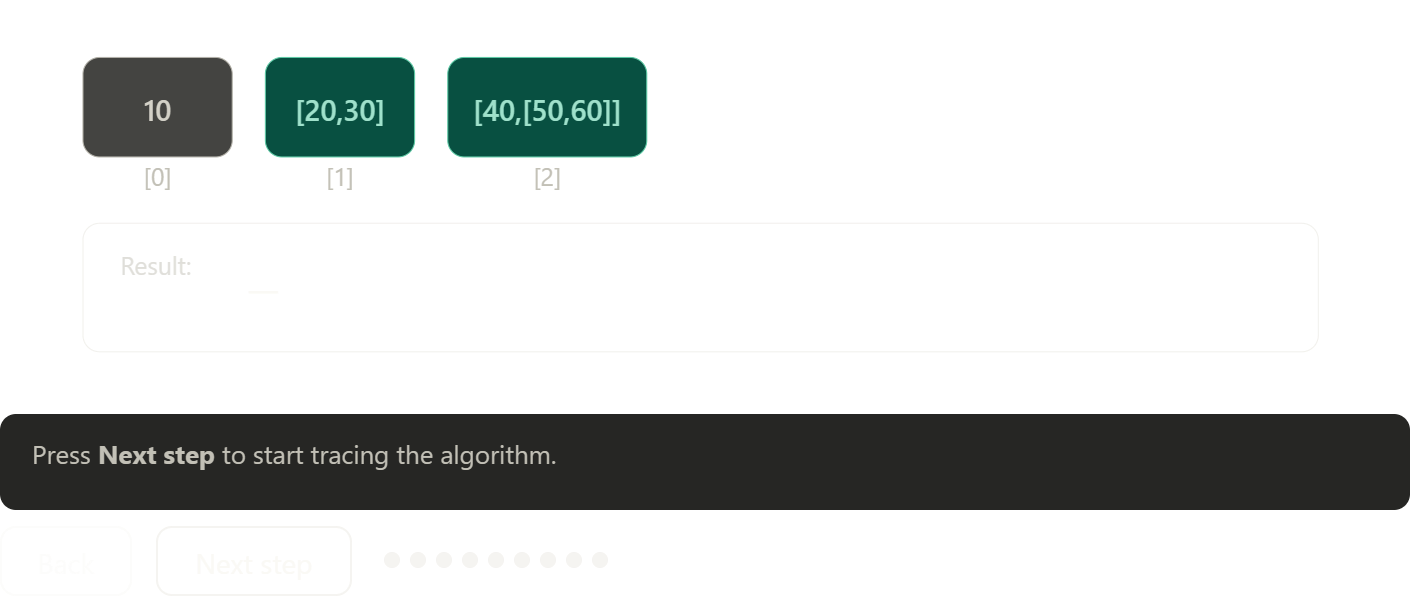
Step through each decision carefully. The thing to notice is that the algorithm never has a special case for "depth 2" or "depth 3" — it just keeps asking the same question at every element it encounters, regardless of how deep it currently is. That self-similarity across levels is the essence of recursion, and flattening is one of the cleanest natural demonstrations of it.
4. Different approaches to flatten arrays
By now you understand what a nested array is and why flattening matters. The next question is a practical one: when you sit down to write code, which approach should you reach for? JavaScript gives you several tools for flattening, and they're not interchangeable — each one has a different strength, a different weakness, and a different mental model behind it.
A quick reminder of what we're solving
Before diving into the approaches, let's anchor on the problem. Given a nested array like this:
const data = [1, [2, 3], [4, [5, [6]]]];
We want to produce this:
[1, 2, 3, 4, 5, 6]
The values are unchanged, the order is preserved, and all intermediate containers — every inner array — are dissolved. Here's the structure we're working with, so the transformation stays concrete in your mind throughout:
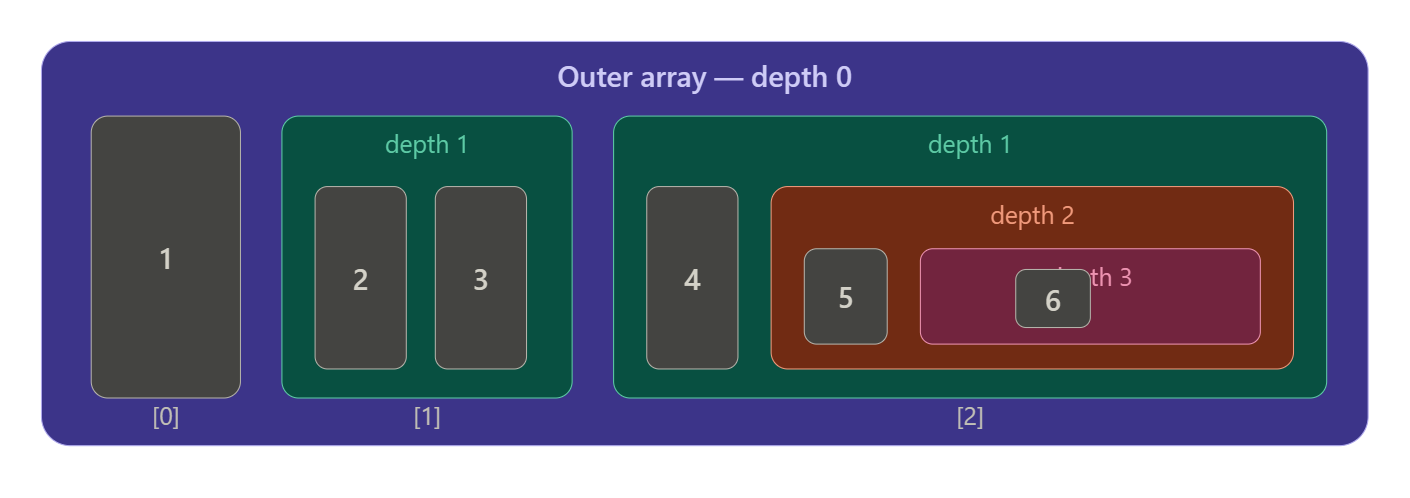
The value 6 lives three containers deep. Any approach we use must be able to reach it — and everything else — correctly.
Approach 1: Array.flat() — the modern default
The cleanest starting point is the built-in .flat() method, introduced in ES2019. If you're working in any modern environment, this is almost always the right first choice.
const data = [1, [2, 3], [4, [5, [6]]]];

data.flat(1);          // [1, 2, 3, 4, [5, [6]]]   — one layer removed
data.flat(2);          // [1, 2, 3, 4, 5, [6]]      — two layers removed
data.flat(3);          // [1, 2, 3, 4, 5, 6]         — fully flat
data.flat(Infinity);   // [1, 2, 3, 4, 5, 6]         — fully flat, any depth
The depth argument is the key concept here. Think of it as a peel counter — you're telling .flat() how many times to unwrap the outermost layer of nesting. With flat(1), each element of the outer array is opened once. The array [5, [6]] is opened, revealing 5 and [6] — but [6] is not opened again because you've used up your one allowed peel.
When you don't know how deep your array goes — or when you simply want everything flat — flat(Infinity) is the idiom to use. It signals clearly to anyone reading the code that you want no nesting whatsoever, regardless of depth.
The notable strength of .flat() is readability. The intent is completely obvious. The notable limitation is that it creates a new array — it does not modify the original — so if you're working with extremely large arrays in a memory-constrained environment, this matters.
Approach 2: Array.flatMap() — transform and flatten together
flatMap() is best understood as .map() followed by .flat(1). But that undersells it a little, because the combination is genuinely more expressive than the two methods separately.
The core use case is when your transformation function produces an array for each input element, and you want all those arrays merged into one result rather than nested inside each other.
// Without flatMap — you get an array of arrays
const words = ["hello world", "foo bar"];
words.map(s => s.split(" "));
// [["hello", "world"], ["foo", "bar"]]

// With flatMap — each result array is spliced into the output
words.flatMap(s => s.split(" "));
// ["hello", "world", "foo", "bar"]
There's a subtler power here too: flatMap lets you return an empty array [] from the mapping function, which effectively filters items out. And returning an array with multiple elements expands one item into many. This means flatMap can simultaneously filter, transform, and expand in a single pass — something that would otherwise require chaining .filter(), .map(), and .flat().
// Expand positive numbers into [n, n*2], skip negatives entirely
const nums = [1, -2, 3, -4, 5];
nums.flatMap(n => n > 0 ? [n, n * 2] : []);
// [1, 2, 3, 6, 5, 10]
The important limitation of flatMap is that it only flattens one level deep — always. You cannot pass a depth argument. If your mapping function produces deeply nested arrays, you'll need to chain .flat() afterwards.
Approach 3: Recursive flattening — writing it yourself
Writing a recursive flatten from scratch is the approach most worth studying in depth, because it forces you to understand the algorithm rather than just consume it. It also gives you maximum control — you can stop at a specific depth, filter values, or transform during the flatten.
function flattenRecursive(arr, depth = Infinity) {
  const result = [];

  for (const item of arr) {
    // Is this item a container, and are we still allowed to go deeper?
    if (Array.isArray(item) && depth > 0) {
      // Recurse: flatten the inner array one level less deep
      result.push(...flattenRecursive(item, depth - 1));
    } else {
      // Base case: plain value, or we've hit our depth limit
      result.push(item);
    }
  }

  return result;
}

flattenRecursive([1, [2, 3], [4, [5, [6]]]]);
// → [1, 2, 3, 4, 5, 6]

flattenRecursive([1, [2, 3], [4, [5, [6]]]], 2);
// → [1, 2, 3, 4, 5, [6]]   — stops at depth 2
The depth - 1 in the recursive call is the insight worth sitting with. Every time the algorithm opens a new array, it decrements the remaining depth allowance. When depth reaches zero, the algorithm stops unwrapping — even if it encounters an inner array — and just collects it as a value. That single line of logic implements the entire depth-control feature.
There's one practical risk with deep recursion worth knowing: very deeply nested arrays can cause a stack overflow, because every recursive call adds a frame to the call stack. For typical data this is never a problem, but it's a reason to prefer the iterative approach in production code working with unknown-depth inputs.
Approach 4: Iterative flattening with a stack — no recursion
The iterative approach uses an explicit stack data structure to simulate what recursion does implicitly. Instead of relying on the call stack, you manage your own stack as an array. This makes the approach safe from stack overflow and often faster for very large inputs.
function flattenIterative(arr) {
  const stack = [...arr];   // start with a copy of the input
  const result = [];

  while (stack.length > 0) {
    const item = stack.pop();   // take from the end

    if (Array.isArray(item)) {
      // It's an array — push its contents back onto the stack to be processed
      stack.push(...item);
    } else {
      // It's a value — collect it
      result.push(item);
    }
  }

  // Because we used pop() (LIFO), the result is reversed — fix that
  return result.reverse();
}

flattenIterative([1, [2, 3], [4, [5, [6]]]]);
// → [1, 2, 3, 4, 5, 6]
The logic here mirrors the recursive version closely — the Array.isArray(item) check is still the core decision — but instead of making a new function call when we find an inner array, we push its contents back onto the stack to be processed in future iterations of the loop. The stack acts like a to-do list: every time we find a new container, we add its contents to the list.
The reverse() at the end is necessary because pop() takes from the end, so elements are collected in reverse order. An alternative is to use shift() and unshift() instead, which preserves order naturally — but push() and pop() are more performant because they operate on the end of the array, not the front.
Approach 5: reduce + concat — functional style
This approach has a more functional flavour and is commonly seen in codebases that favour immutability and chaining. It uses Array.reduce() to build up the result, concatenating a recursively flattened version of each element:
function flattenReduce(arr) {
  return arr.reduce((result, item) => {
    return result.concat(
      Array.isArray(item) ? flattenReduce(item) : item
    );
  }, []);
}

flattenReduce([1, [2, 3], [4, [5, [6]]]]);
// → [1, 2, 3, 4, 5, 6]
The ternary inside the reduce callback is the same decision as always: if it's an array, recurse into it; if it's a value, just concatenate it. The [] seed value is the initial empty result that each pass builds onto.
This is elegant and readable, but there's a performance consideration worth understanding. concat creates a new array on every call rather than mutating in place. For a deeply nested array with many values, this means many intermediate arrays being created and garbage collected. For large datasets this can add up, making the push-based approaches more efficient in practice.
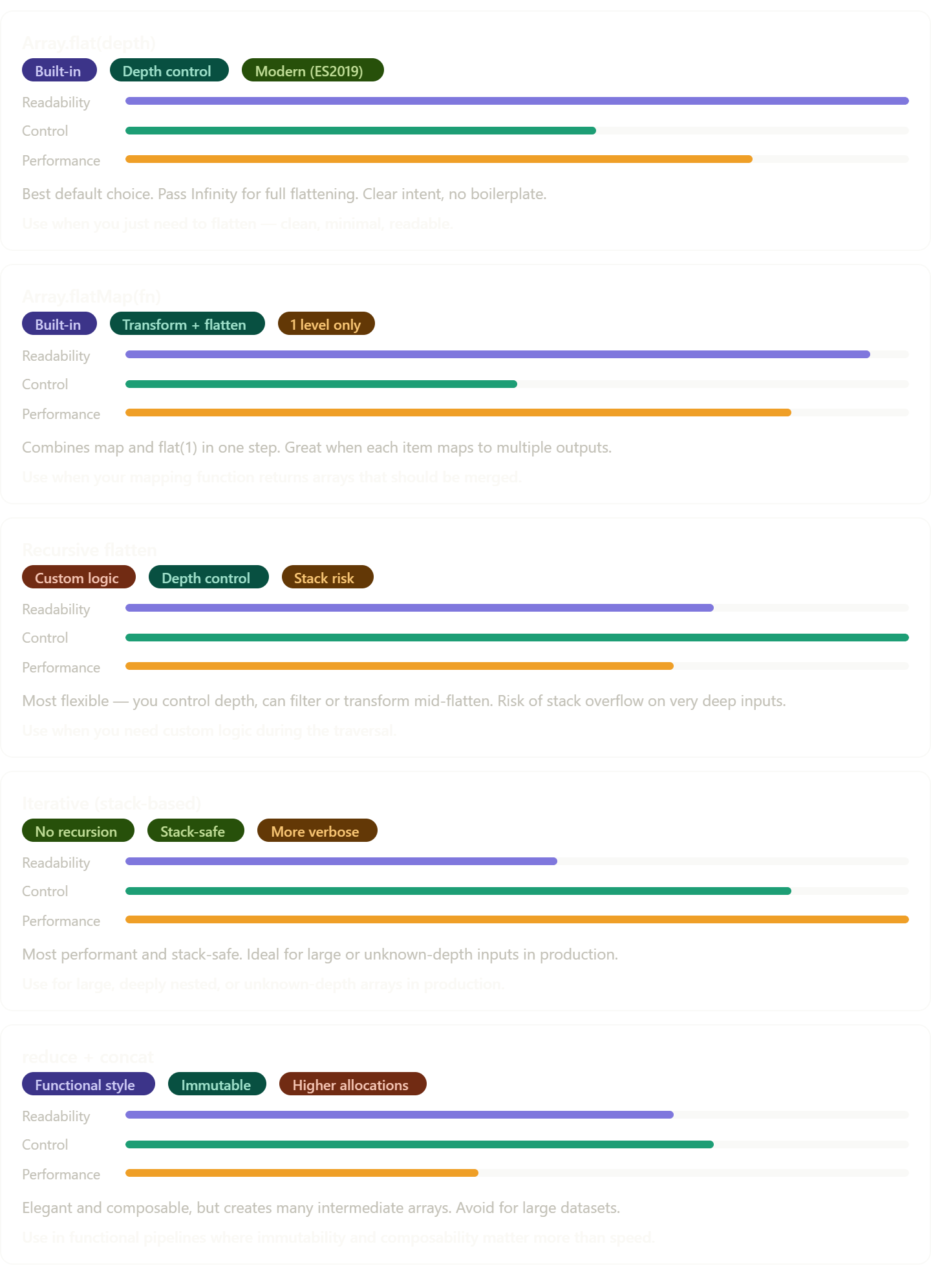
Seeing all approaches side by side
Now that you've seen each approach, it helps to see how they compare along the dimensions that actually matter when making a choice:
The flatten transformation itself
It helps to see the final output of any approach laid out against the original structure. Whatever method you choose, this is the transformation that must happen:
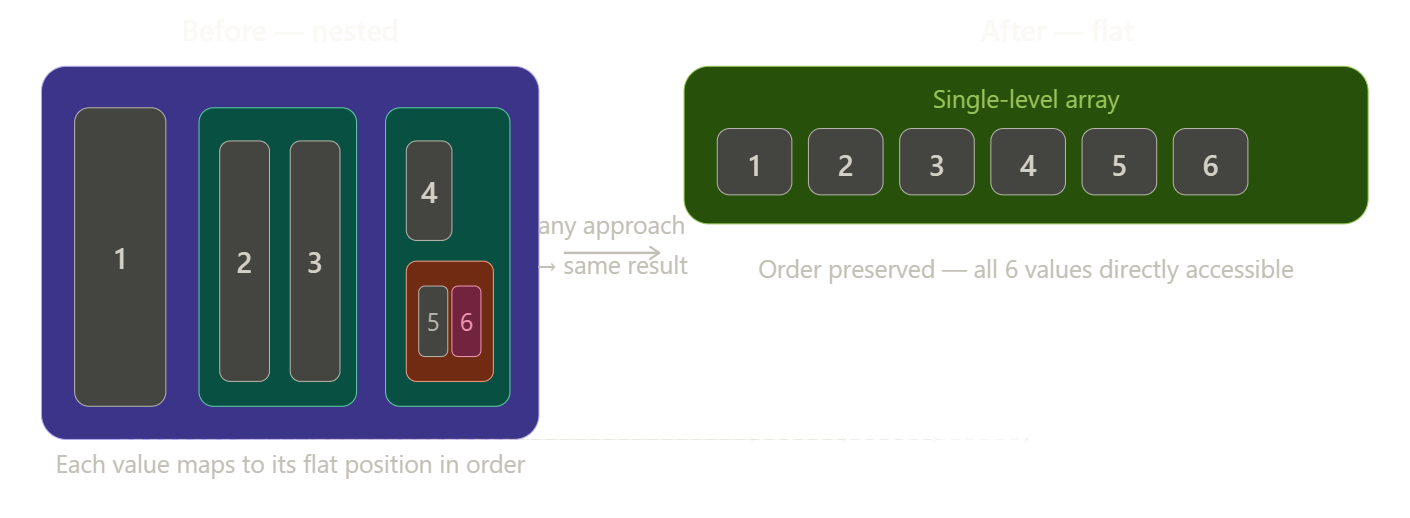
The dashed lines trace each value from its nested position to its final address in the flat result. No matter which of the five approaches you use, this mapping is the outcome — the approaches differ only in how they produce it.
A decision framework: how to choose
With five approaches in hand, the question becomes: how do you decide? Here's the thinking process worth internalising.
Start by asking whether you're in a modern environment. If you're writing code that runs in a recent Node.js version or modern browser and you have no special requirements, Array.flat(Infinity) is the answer. It's readable, correct, and unambiguous. There's rarely a good reason to write something more complex when the built-in does the job clearly.
Next, ask whether you're transforming while flattening. If you need to extract a property from each object, split each string, or expand each item into multiple new items and merge those results together, flatMap is the natural fit. It handles the transform-and-flatten pattern better than any combination of other methods.
Then ask about depth. If you only need to collapse one level — for example, you have an array of arrays but each inner array contains only plain values — flat(1) is precise and honest. Reaching for Infinity when you only need one level is technically harmless but slightly misleading about your intent.
Ask about custom logic next. If you need to do something special during the traversal — skip certain values, transform while flattening, add logging for debugging — the recursive approach gives you a hook at every element. The built-in methods are black boxes; your own recursive function is a clear box you can inspect and modify.
Finally, ask about scale and safety. If you're flattening arrays that arrive from an external source and could be arbitrarily deep, or if you're processing very large datasets, the iterative stack-based approach is the production-grade choice. It cannot overflow the call stack, it avoids the allocation overhead of concat, and it performs consistently even under extreme input conditions.
Putting the approaches to work: a practical scenario
Let's make the decision feel real by walking through a concrete situation. Suppose you're building a search feature. Your backend returns search results grouped by category:
const results = {
  articles: ["React hooks", "CSS grid", "TypeScript basics"],
  videos:   ["Node.js tutorial", "Git workflow"],
  courses:  [["Beginner JS", "Intermediate JS"], ["Python intro"]]
};
You want a flat list of every single result title to display in the UI. Notice that courses is doubly nested — it's an array of arrays of strings — while the others are just one level deep.
const allGroups = Object.values(results);
// [["React hooks","CSS grid","TypeScript basics"],
//  ["Node.js tutorial","Git workflow"],
//  [["Beginner JS","Intermediate JS"], ["Python intro"]]]

// Option A — flat(Infinity): simplest, handles all depths
const titlesA = allGroups.flat(Infinity);

// Option B — flatMap: good here because we're extracting from objects
const titlesB = Object.values(results).flatMap(group => group.flat());

// Option C — recursive: gives you a hook to filter, e.g. exclude short titles
function flattenFiltered(arr) {
  return arr.reduce((acc, item) => {
    if (Array.isArray(item)) return acc.concat(flattenFiltered(item));
    if (item.length > 5) acc.push(item); // only titles longer than 5 chars
    return acc;
  }, []);
}
Each approach works. The right choice depends on whether you need the filtering hook (recursive), whether the clean .flat(Infinity) is sufficient (it is, for straightforward cases), or whether you're already inside a chain of array operations where flatMap slots in naturally.
5.Common interview scenarios
Technical interviews around array flattening are not really about arrays. They're about how you think through an unfamiliar problem, how you communicate your reasoning, and whether you can write clean, correct code under pressure. The array is just the vehicle.
Scenario 1: "Implement a flatten function without using .flat()"
Array flattening sits at a perfect intersection of skills. It tests your understanding of recursion without being so abstract that it requires deep CS theory. It tests your knowledge of JavaScript's built-in methods without being a trivia quiz. It tests your ability to handle edge cases. And it scales naturally in difficulty — the interviewer can make it trivially easy or surprisingly hard just by adding constraints.
That's why it appears so often. Before diving into the specific scenarios, here's the shape of a typical flattening problem visualised so the structure stays concrete:
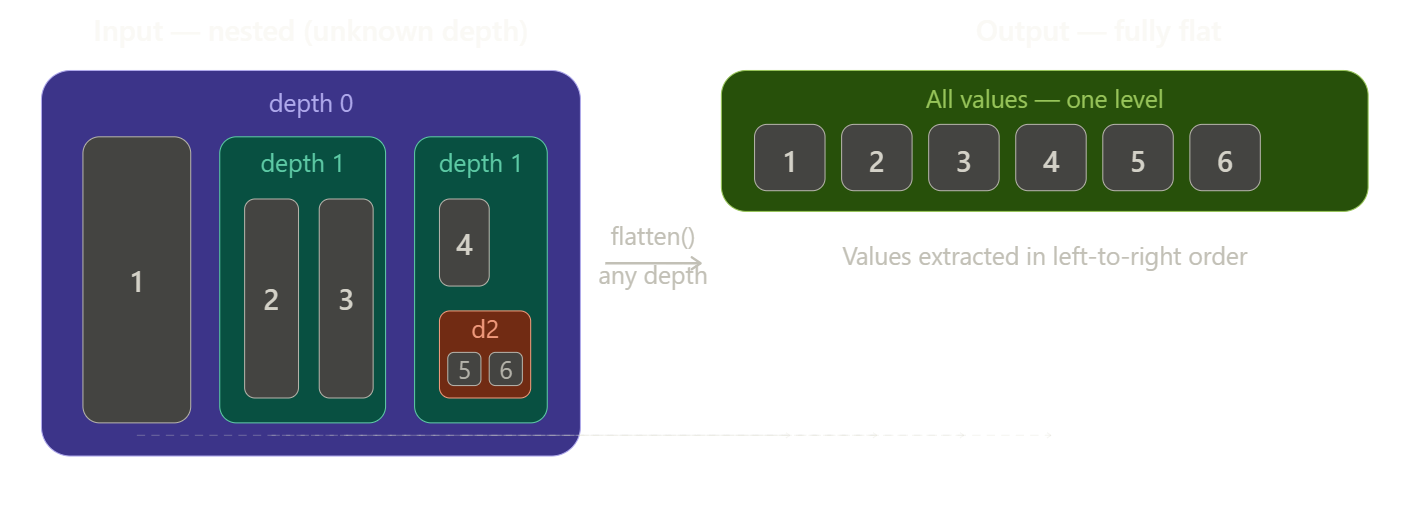
Keep this picture in mind throughout. The input has unknown structure; the output is always a flat sequence. Your job is to write code that reliably makes that transformation happen.
Scenario 1: "Implement a flatten function without using .flat()"
This is the most common interview question in this space and the one that reveals the most. The constraint — no built-ins — is not about .flat() specifically. It's about whether you understand what .flat() actually does.
The interviewer is watching for: do you jump straight into code, or do you reason about the structure first?
The thinking process to verbalise:
Start by describing the problem in your own words before touching the keyboard. Something like: "I need to walk every element of the array. If an element is a plain value, I collect it. If it's itself an array, I need to go inside it and apply the same logic. That means the natural approach is recursive — the same function applies at every level."
Then write the solution:
function flatten(arr) {
  const result = [];

  for (const item of arr) {
    if (Array.isArray(item)) {
      // Open the inner array — recurse into it
      // and spread its (already-flat) result into ours
      result.push(...flatten(item));
    } else {
      result.push(item);
    }
  }

  return result;
}

// Test it
flatten([1, [2, 3], [4, [5, [6]]]]);
// → [1, 2, 3, 4, 5, 6]
After writing it, narrate what happens on the input. Walk through the first two elements. Show that you know the recursion terminates — every recursive call is on a strictly smaller sub-array, so the stack eventually unwinds. Interviewers listen for this kind of proof-of-correctness reasoning.
What trips people up: Forgetting to handle the case where elements are not arrays. Forgetting that push(...arr) spreads, while push(arr) nests. Using result = result.concat(...) which works but creates unnecessary intermediate arrays at every step.
Scenario 2: "Now add a depth parameter"
Almost every interviewer who asks Scenario 1 follows up with this. You've written a fully recursive flatten — now make it respect a depth limit. This tests whether you can extend your own solution cleanly.
The key insight is that depth is simply a counter you pass down. At each recursive call, you reduce it by one. When it hits zero, you stop recursing — even if you're looking at an array.
function flatten(arr, depth = Infinity) {
  const result = [];

  for (const item of arr) {
    if (Array.isArray(item) && depth > 0) {
      // Still have depth budget — recurse one level deeper
      result.push(...flatten(item, depth - 1));
    } else {
      // Either a plain value, or depth is exhausted — collect as-is
      result.push(item);
    }
  }

  return result;
}

flatten([1, [2, [3, [4]]]], 1);  // [1, 2, [3, [4]]]
flatten([1, [2, [3, [4]]]], 2);  // [1, 2, 3, [4]]
flatten([1, [2, [3, [4]]]]);     // [1, 2, 3, 4]  (Infinity default)
The elegant part is that depth - 1 does all the work. The function doesn't need to know how deep it currently is — it just knows how much depth budget remains. When that budget is zero, it treats even arrays as opaque values and stops.
Trace through flatten([1, [2, [3]]], 1) out loud during the interview to show you can follow the execution mentally:
Visit
1→ not an array, collect. Result:[1]Visit
[2, [3]]→ is array, depth=1 > 0, recurse with depth=0Visit
2→ not an array, collect. Inner result:[2]Visit
[3]→ is array, but depth=0, collect as-is. Inner result:[2, [3]]
Spread inner result into outer. Final result:
[1, 2, [3]]
Scenario 3: "What's the problem with your solution for very large inputs?"
This is a senior-level follow-up that tests your awareness of practical limitations. The answer is stack overflow. JavaScript's call stack has a finite size — typically around 10,000–15,000 frames depending on the engine. A deeply nested array like [[[[[...5000 levels deep...5000]]]]] would exhaust it.
The interviewer wants to hear that you know this and can articulate the fix.
Your answer: "Deep recursion can overflow the call stack because each recursive call adds a frame. For deeply nested or unknown-depth inputs, the safe solution is to convert to an iterative approach using an explicit stack — a data structure you manage yourself in the heap, which has no meaningful size limit."
Then write it:
function flattenIterative(arr) {
  const stack = [...arr];   // working list — start with input
  const result = [];

  while (stack.length > 0) {
    const item = stack.pop();  // take from end (LIFO)

    if (Array.isArray(item)) {
      // Push contents back for processing
      // spread IN REVERSE so left-to-right order is preserved
      stack.push(...item);
    } else {
      result.push(item);
    }
  }

  // pop() reverses order — correct it
  return result.reverse();
}
The key detail that shows depth of understanding is the reverse() at the end and why it's necessary. Because pop() takes from the end of the stack, elements are collected right-to-left. The reverse() restores the original left-to-right order. Mentioning this unprompted signals that you actually traced through the algorithm and didn't just copy a pattern.
Scenario 4: "How would you flatten an array of objects, extracting a specific field?"
This scenario moves from pure data manipulation into real-world applicability. You're no longer just flattening — you're flattening while transforming, which is where flatMap earns its place in your vocabulary.
The problem might look like this:
const departments = [
  { name: "Engineering", members: ["Alice", "Bob"] },
  { name: "Design",      members: ["Carol"] },
  { name: "Product",     members: ["Dave", "Eve", "Frank"] }
];

// Goal: ["Alice", "Bob", "Carol", "Dave", "Eve", "Frank"]
The thinking process to verbalise:
"I need to extract members from each object — that's a map operation. Each members is an array, so mapping produces an array of arrays. I then need to flatten one level. That's exactly the flatMap pattern."
// Option A — explicit map + flat
const allMembers = departments
  .map(dept => dept.members)
  .flat();

// Option B — flatMap (more concise, same result)
const allMembers = departments.flatMap(dept => dept.members);
Then go further — show you can handle it when the structure is more complex:
// What if some departments have sub-teams?
const data = [
  { name: "Engineering", teams: [
    { name: "Frontend", members: ["Alice", "Bob"] },
    { name: "Backend",  members: ["Carol", "Dave"] }
  ]},
  { name: "Design", teams: [
    { name: "UX", members: ["Eve"] }
  ]}
];

// Goal: all member names flat
const allMembers = data
  .flatMap(dept => dept.teams)       // flatten to team level
  .flatMap(team => team.members);    // flatten to member level

// → ["Alice", "Bob", "Carol", "Dave", "Eve"]
Chaining flatMap calls is a powerful pattern. Each one collapses one level of the hierarchy. Showing this voluntarily — when the question only required one level — signals that you understand the pattern generally, not just for the specific example given.
Scenario 5: "Can you write a flatten that also filters or transforms?"
This is a test of whether you understand that flattening is just a traversal, and that traversals can do additional work. The interviewer wants to see you extend a pattern rather than reach for a black-box solution.
Example prompt: "Flatten the array but only keep numbers greater than 3."
function flattenFilter(arr, predicate) {
  const result = [];

  for (const item of arr) {
    if (Array.isArray(item)) {
      // Recurse — collect filtered results from inner arrays
      result.push(...flattenFilter(item, predicate));
    } else if (predicate(item)) {
      // Only collect items that pass the filter
      result.push(item);
    }
  }

  return result;
}

flattenFilter([1, [2, 5], [3, [4, 6]]], n => n > 3);
// → [5, 4, 6]
The insight to verbalise: "Flattening is just a tree traversal. At every leaf — every plain value — I normally collect it unconditionally. Adding a filter just means I add a condition before collecting. The recursive structure doesn't change at all."
This framing — that flattening is a traversal and filtering is just a condition at collection time — is a strong signal of algorithmic maturity. It shows you see the general pattern, not just the specific case.
Scenario 6: The edge cases round
After any of the above scenarios, expect the interviewer to probe edge cases. This is where many candidates stumble because they haven't thought about failure modes. Here are the ones that come up most often, with the correct handling:
// Empty array — should return empty array, not throw
flatten([]);                    // → []

// Already flat — should return a copy, unchanged
flatten([1, 2, 3]);             // → [1, 2, 3]

// Mixed types — strings, booleans, nulls are plain values, not arrays
flatten([1, "two", [true, null]]); // → [1, "two", true, null]

// Sparse arrays — holes in arrays are tricky
flatten([1, , 3]);              // → depends on implementation; discuss explicitly

// Deeply nested single value
flatten([[[[[[42]]]]]]);        // → [42]

// Array containing empty arrays
flatten([[], [1], [], [2, []]]);  // → [1, 2]
The right move in an interview is not to handle all of these silently — it's to name them out loud. Say: "I want to check a few edge cases. What should happen with empty arrays? What about mixed types — should strings be treated as plain values?" This shows rigour and also gives you a chance to get confirmation before writing code that might not match the interviewer's mental model.
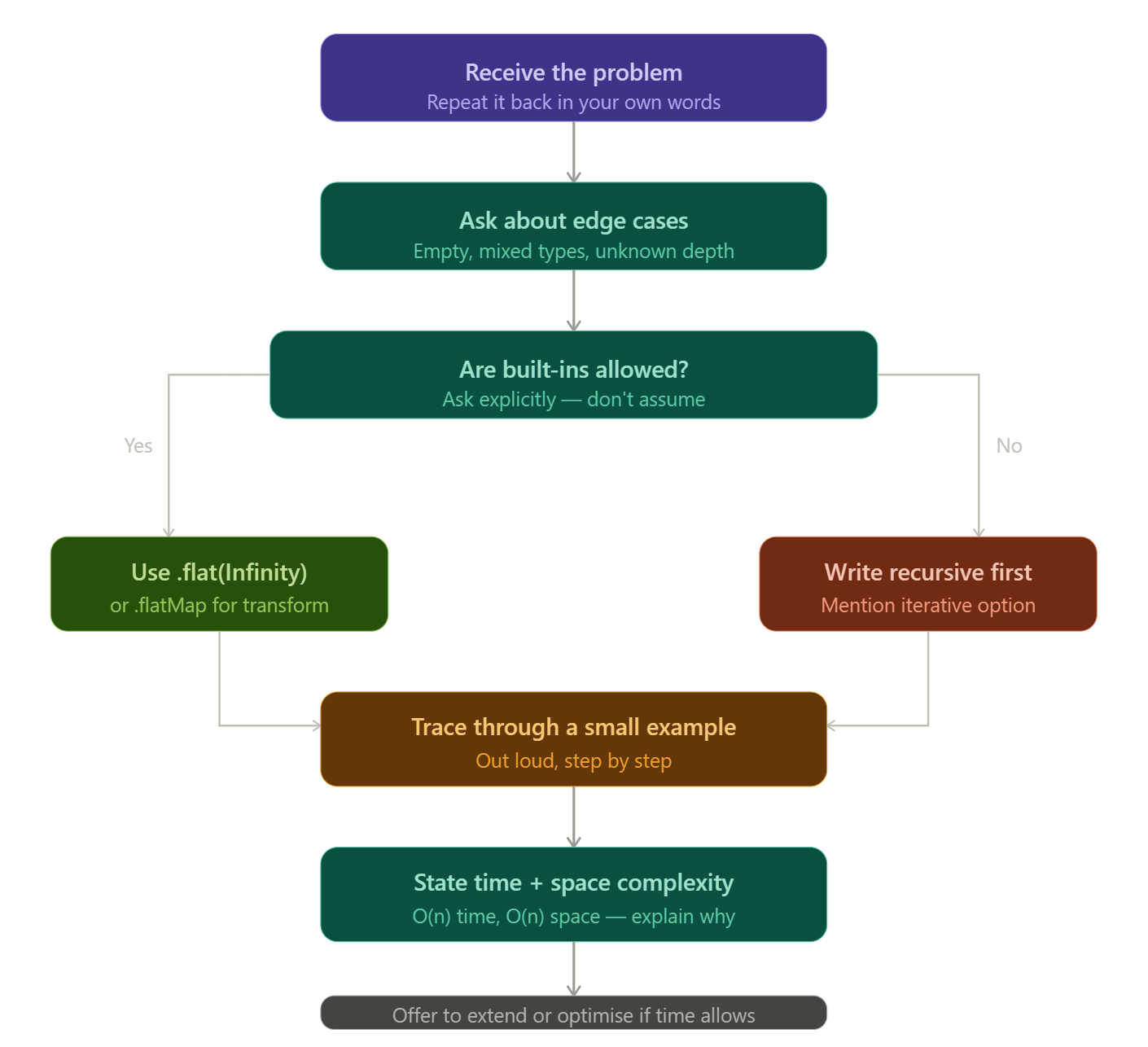
The step-by-step thinking map
Here is the complete mental process to bring to any array flattening interview question, visualised as a decision flow you can internalise: