
Map and Set in JavaScript
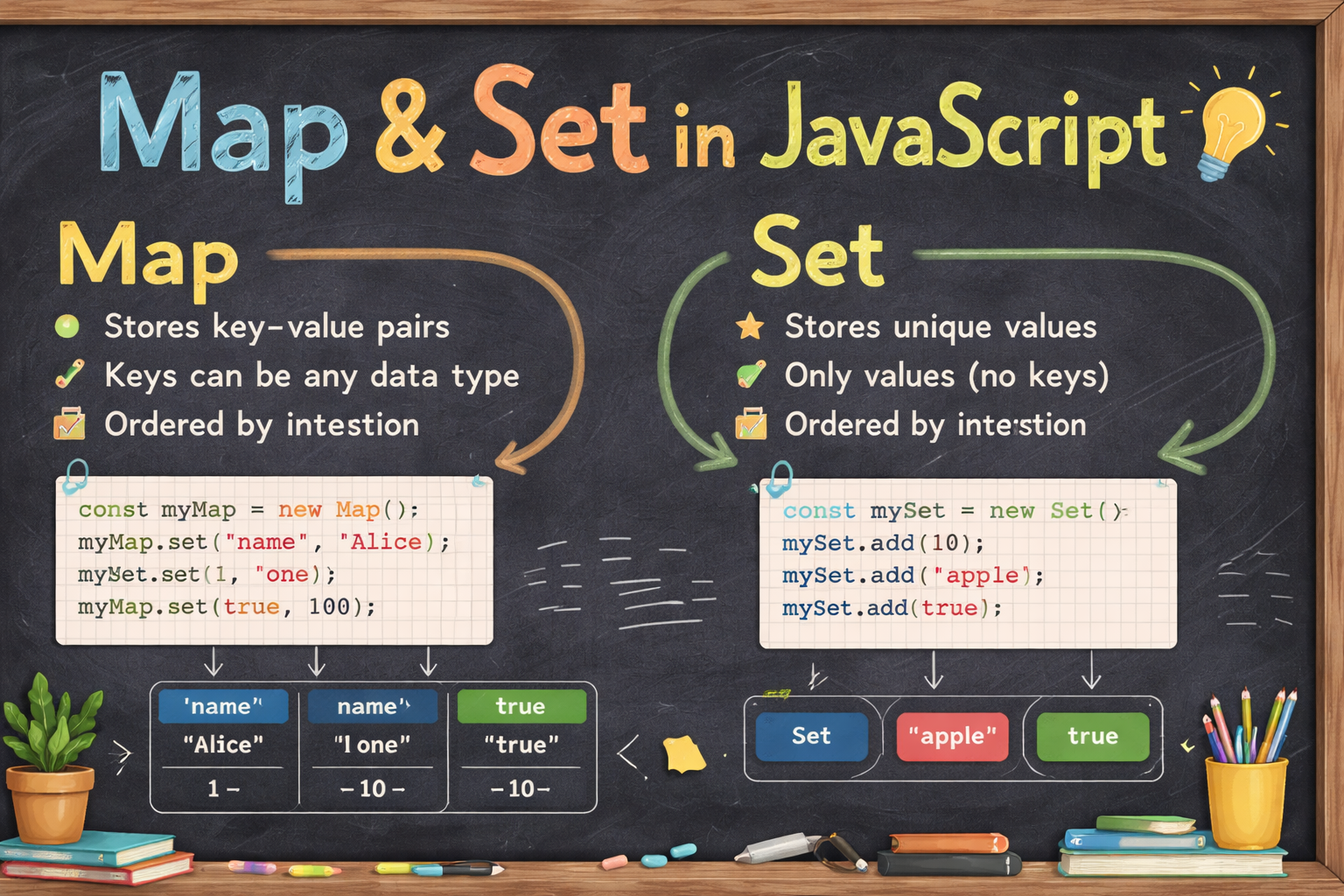
1. Map and Set in JavaScript
an interactive visual explainer covering Map, Set, the problems they solve, and how they compare to traditional objects and arrays. Click through each section to explore.
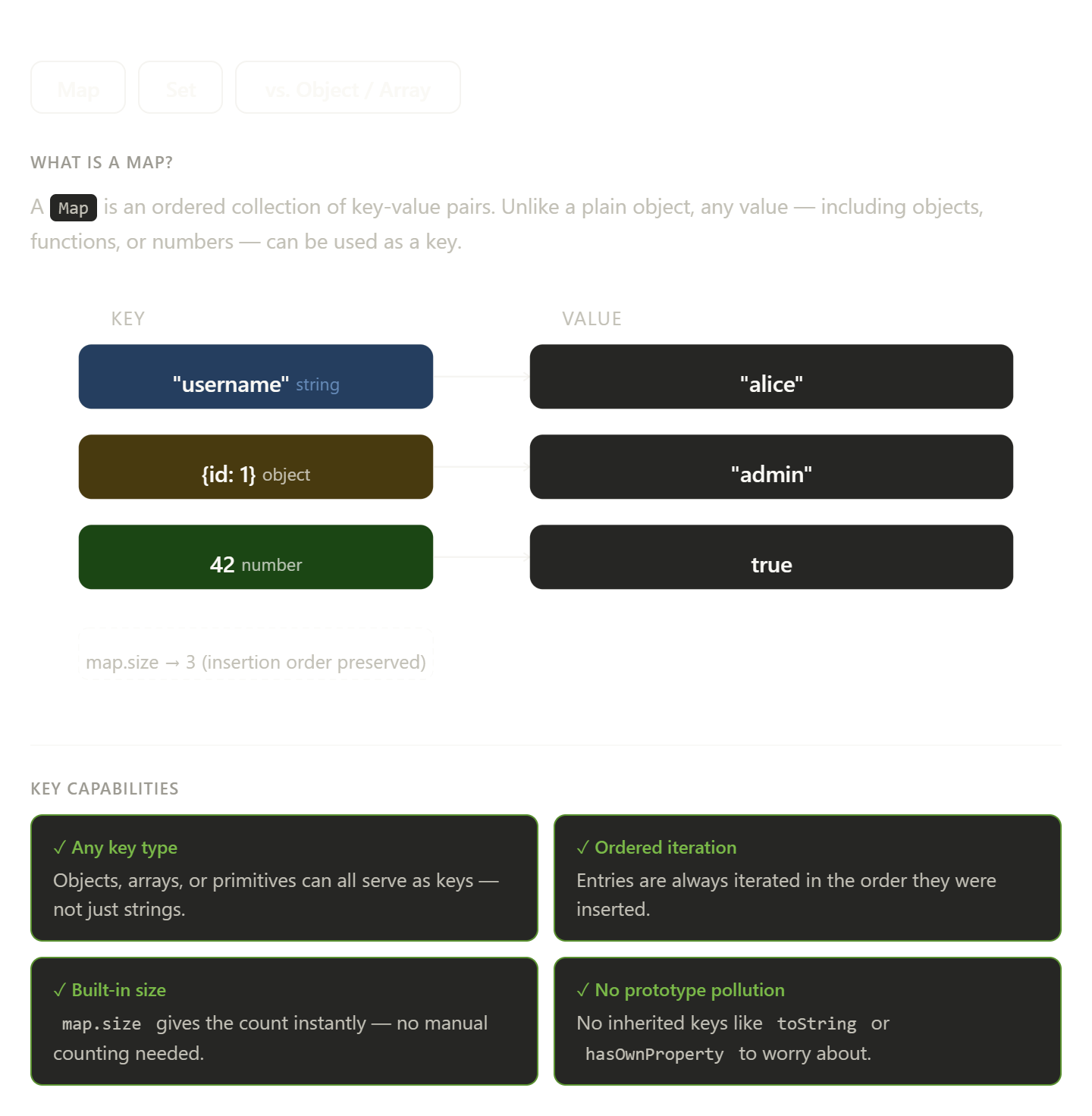
The widget above is fully interactive — click the tabs to switch between Map, Set, and the comparison view.
What Map solves. A plain JavaScript object coerces every key to a string, so using an object as a key silently becomes "[object Object]". Map sidesteps this entirely by accepting any value as a key — objects, numbers, functions, or primitives — while also preserving insertion order and exposing a reliable .size property.
What Set solves. Arrays have no concept of uniqueness, so deduplication requires manual filtering and membership checks via .includes() scan the entire array. A Set enforces uniqueness automatically, and .has() runs in constant time regardless of how many elements the set contains.
The practical rule of thumb is to reach for Map whenever you need a key-value store where the keys are not plain strings, and to reach for Set whenever you need a collection where each element must appear exactly once.
2. What Set is
The problem with arrays and objects
Arrays don't enforce uniqueness — [1, 1, 2, 2] is perfectly valid. To deduplicate, you'd manually loop or use filters. Objects work as key-value stores, but keys are always strings (or Symbols), which is limiting. Map and Set were introduced in ES6 to solve exactly these gaps.
1. Set — a collection of unique values
A Set stores values where every entry must be distinct. Adding a duplicate simply does nothing.
const s = new Set([1, 2, 2, 3, 3]);
console.log(s); // Set {1, 2, 3}
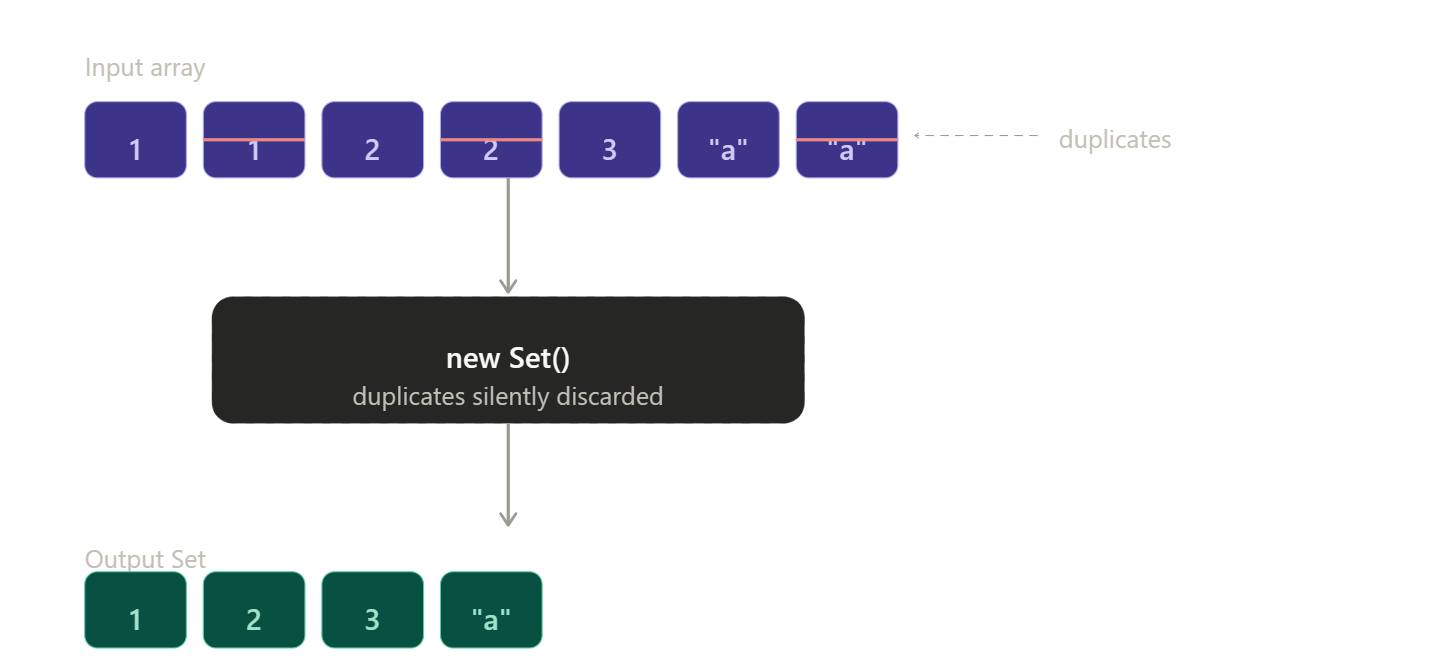
Key Set methods: .add(v), .has(v), .delete(v), .size, and it's directly iterable. A common pattern is [...new Set(arr)] to deduplicate any array in one line.
2. Map — key-value storage with any key type
A Map is like an object, but keys can be anything — objects, arrays, functions, numbers. Insertion order is also preserved.
const m = new Map();
const keyObj = { id: 1 };
m.set(keyObj, "user data");
m.set(42, "a number key");
m.get(keyObj); // "user data"
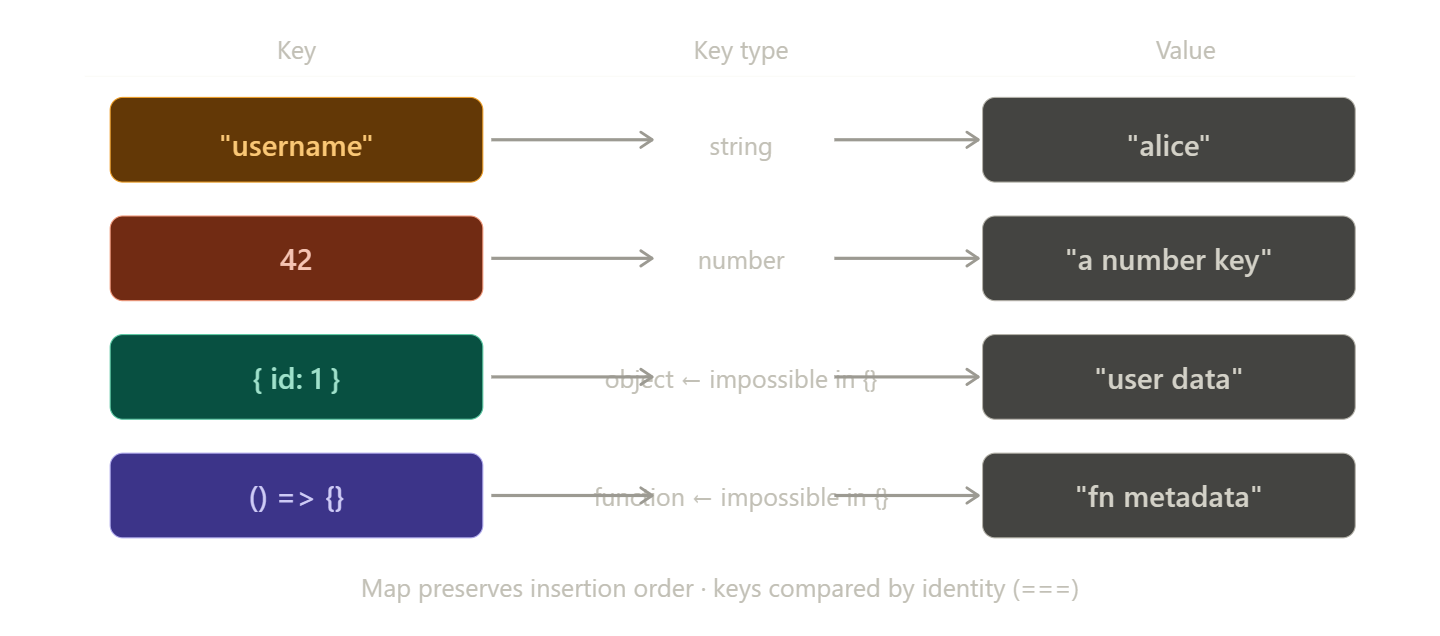
Key Map methods: .set(k, v), .get(k), .has(k), .delete(k), .size. You can also iterate with .forEach() or for...of over [key, value] pairs.
Quick comparison
Set |
Map |
Plain {} |
|
|---|---|---|---|
| Purpose | Unique values | Key → value | Key → value |
| Key types | — | Any | String / Symbol |
| Duplicates | Rejected | Keys must be unique | Keys must be unique |
| Order preserved | ✓ | ✓ | ✓ (modern JS) |
| Size property | .size |
.size |
Object.keys().length |
3. Difference between Map and Object
Here's a thorough breakdown of every meaningful difference between Map and a plain Object in JavaScript.
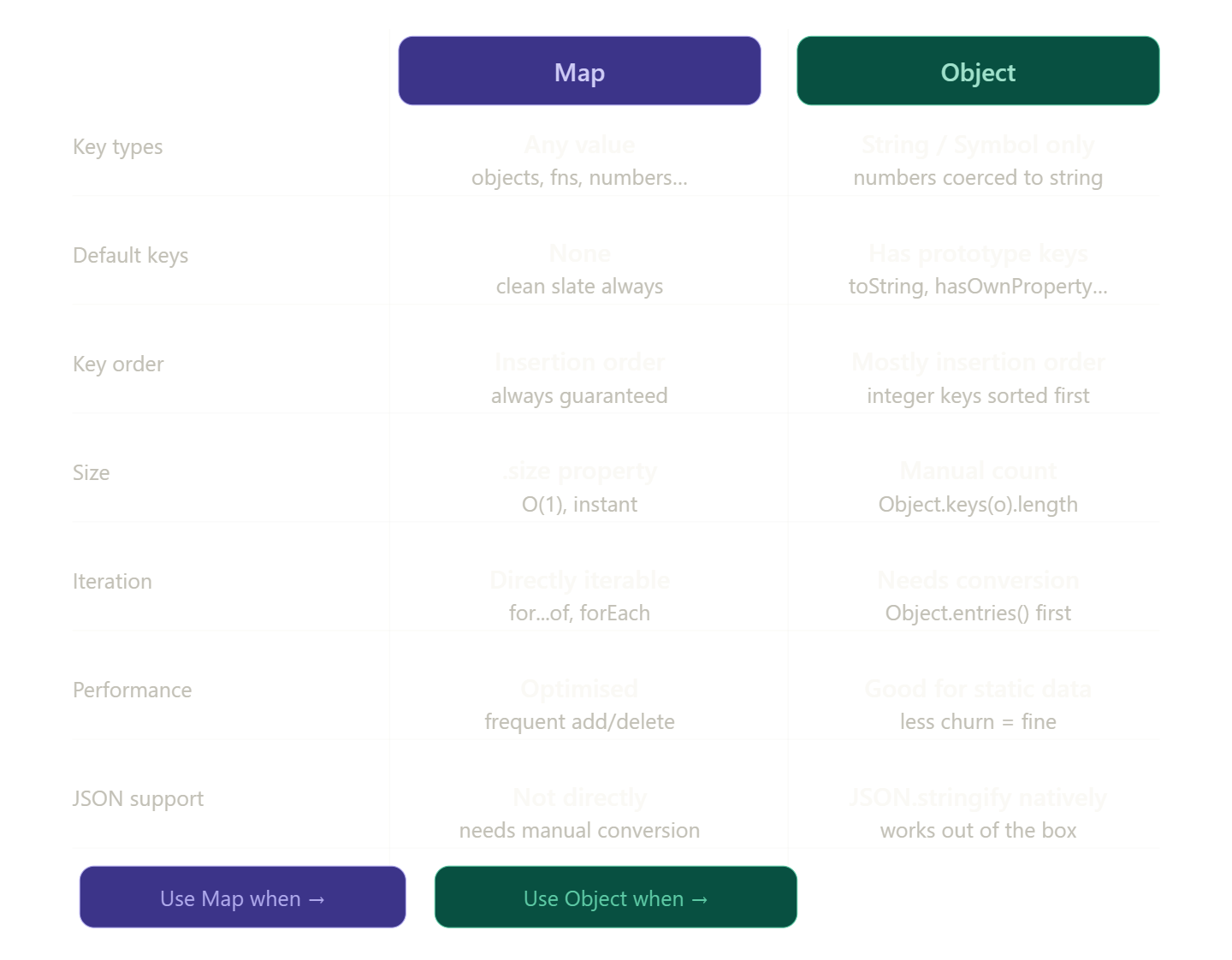
Here are the key differences explained:
Key types — this is the biggest one. An Object always coerces keys to strings, so obj[1] and obj["1"] are literally the same key. A Map uses strict equality (===) and accepts anything — DOM nodes, functions, other objects — as keys.
const map = new Map();
const key = { id: 42 };
map.set(key, "metadata");  // works
map.get({ id: 42 });       // undefined — different reference!
map.get(key);              // "metadata" — same reference ✓
Prototype pollution — a plain Object inherits keys from Object.prototype (toString, constructor, etc.). This can cause subtle bugs when checking "hasOwnProperty" in obj. A Map starts completely empty, no inherited keys.
Integer key sorting — Object sorts integer-like keys numerically before all others, which can silently break expected insertion order. Map never does this.
When to use each:
Use Map when you have non-string keys, need to frequently add/remove entries, need the exact count quickly via .size, or need to iterate key-value pairs directly.
Use a plain Object when your data is simple string-keyed config or records, you need JSON serialization (APIs, localStorage), or you're writing code that others will read — objects are more familiar to most developers.
const obj = { name: "alice", age: 30 };
JSON.stringify(obj);  // '{"name":"alice","age":30}' ✓

const map = new Map([["name", "alice"]]);
JSON.stringify(map);  // '{}'  ← silently empty!
4. difference between Set and Array in JavaScript.
Here's a breakdown of every meaningful difference between Set and Array in JavaScript.
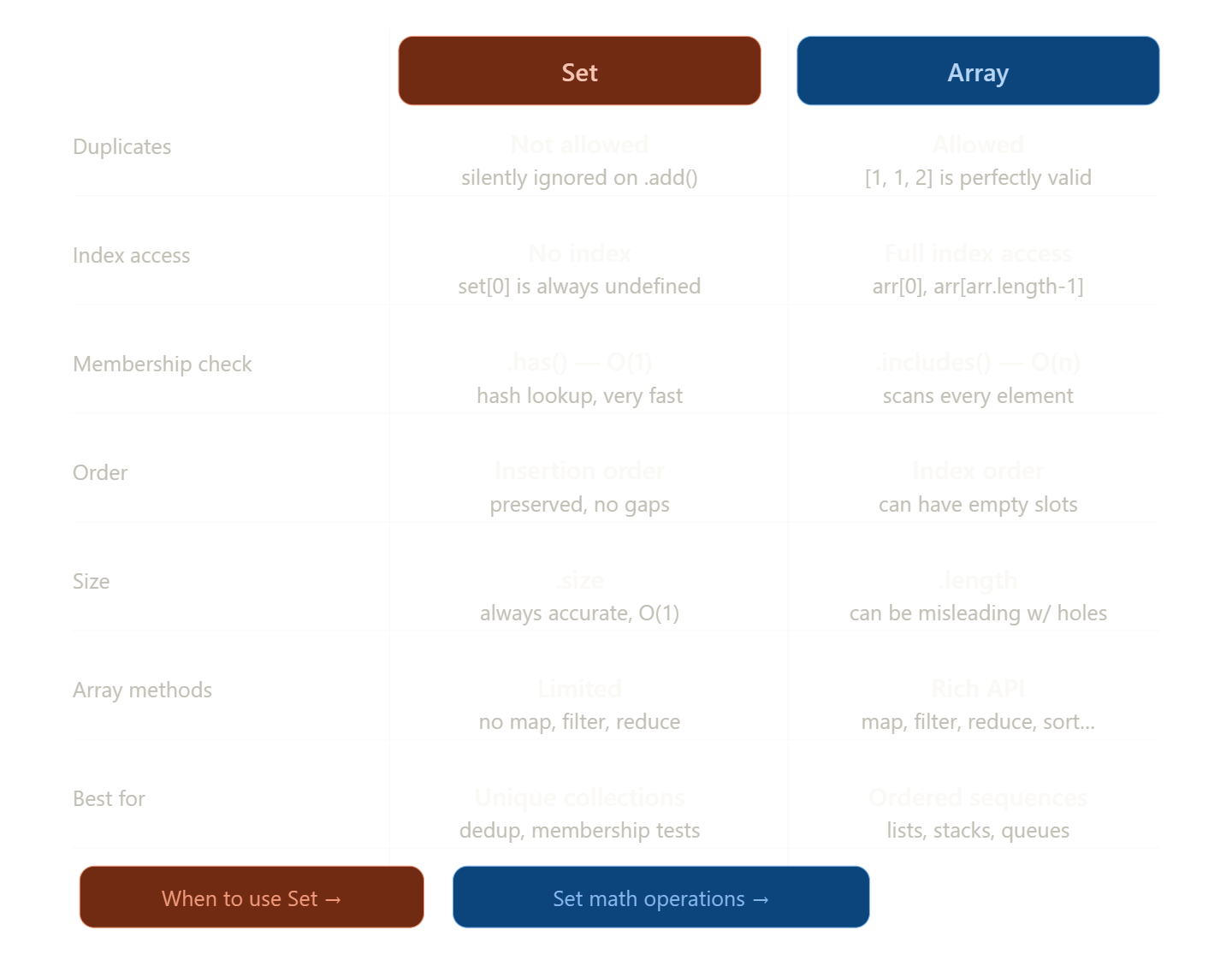
Here are the differences that matter most in practice:
Uniqueness vs duplicates — the fundamental split. Set enforces uniqueness by design; .add() on an existing value is a silent no-op. Array happily holds [1, 1, 1].
Index access — Array is index-based, so you can do arr[0], arr.at(-1), slicing, etc. Set has no concept of position — set[0] is always undefined. If you need "the first item", convert it first: [...set][0].
Membership check — this is where Set shines for performance:
const arr = [1, 2, 3, ...millions];
arr.includes(x);   // O(n) — checks every element

const set = new Set([1, 2, 3, ...millions]);
set.has(x);        // O(1) — instant hash lookup
For large collections where you frequently check "is this value present?", Set is dramatically faster.
Array methods — Set has no .map(), .filter(), or .reduce(). You either spread it first or use .forEach(). This is the main friction point:
const set = new Set([1, 2, 3, 4]);

// Must convert to use array methods
const doubled = [...set].map(x => x * 2);  // [2, 4, 6, 8]
The deduplication trick — the most common real-world use of Set is as a quick dedup tool:
const tags = ["js", "css", "js", "html", "css"];
const unique = [...new Set(tags)];  // ["js", "css", "html"]
Rule of thumb: reach for Array by default. Switch to Set when you need uniqueness guaranteed, or when you're doing heavy membership checks on large data.
5. When to use Map and Set
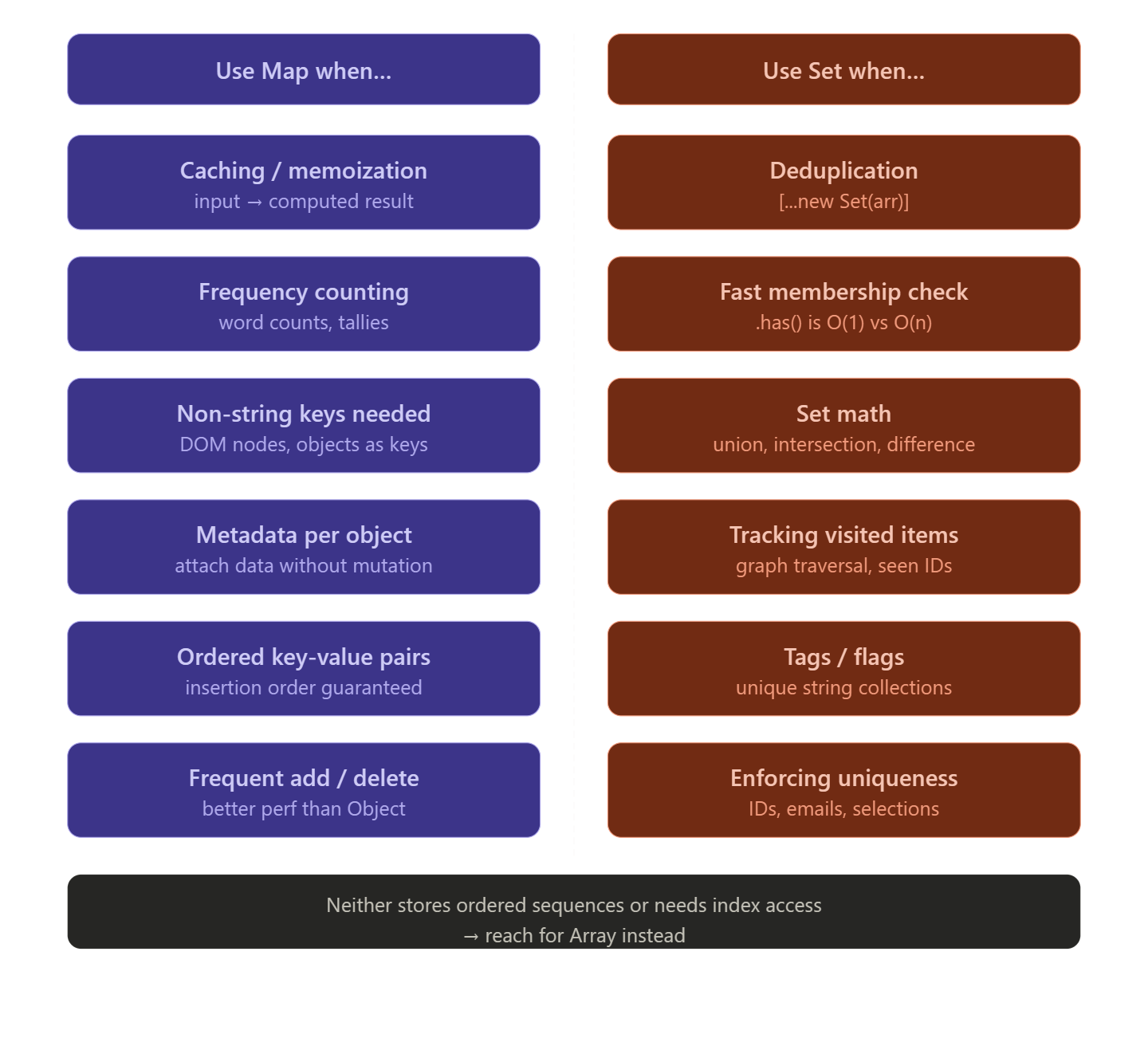
Here's the thinking behind each:
Reach for Map when you need key → value association. The clearest signal is memoization — storing the result of an expensive function call keyed by its input:
const cache = new Map();
function expensiveCalc(n) {
  if (cache.has(n)) return cache.get(n);
  const result = /* heavy work */;
  cache.set(n, result);
  return result;
}
Also use Map when counting frequencies — it's cleaner than an object because you don't worry about prototype keys colliding with your data:
const freq = new Map();
for (const word of words) {
  freq.set(word, (freq.get(word) ?? 0) + 1);
}
Reach for Set when you only care about existence, not association. The most common pattern is tracking what you've already seen — perfect for graph traversal or avoiding repeat processing:
const visited = new Set();
function dfs(node) {
  if (visited.has(node)) return;
  visited.add(node);
  node.neighbors.forEach(dfs);
}
The other killer use case is the one-liner dedup: [...new Set(arr)] — converts an array to unique values and back in a single expression.
The mental checklist:
Do I need to associate a value with each item? →
MapDo I just need to know if an item exists? →
SetDo I need index access or rich methods like
.map()/.filter()? →ArrayDo I need simple string-keyed config that goes through JSON? → plain
Object


