Template Literals in JavaScript
1.Problems with traditional string concatenation
The Problem with String Concatenation (And How Template Literals Fix It)
If you've written JavaScript for more than a week, you've almost certainly done something like this:
var greeting = "Hello, " + name + "! You have " + count + " messages.";
It works. But it's a mess. As strings grow — with more variables, newlines, and HTML — concatenation becomes increasingly fragile and hard to read. Template literals, introduced in ES6, solve this problem cleanly.
Let's walk through exactly what goes wrong with traditional concatenation and how template literals fix it.
The Problem: String Concatenation
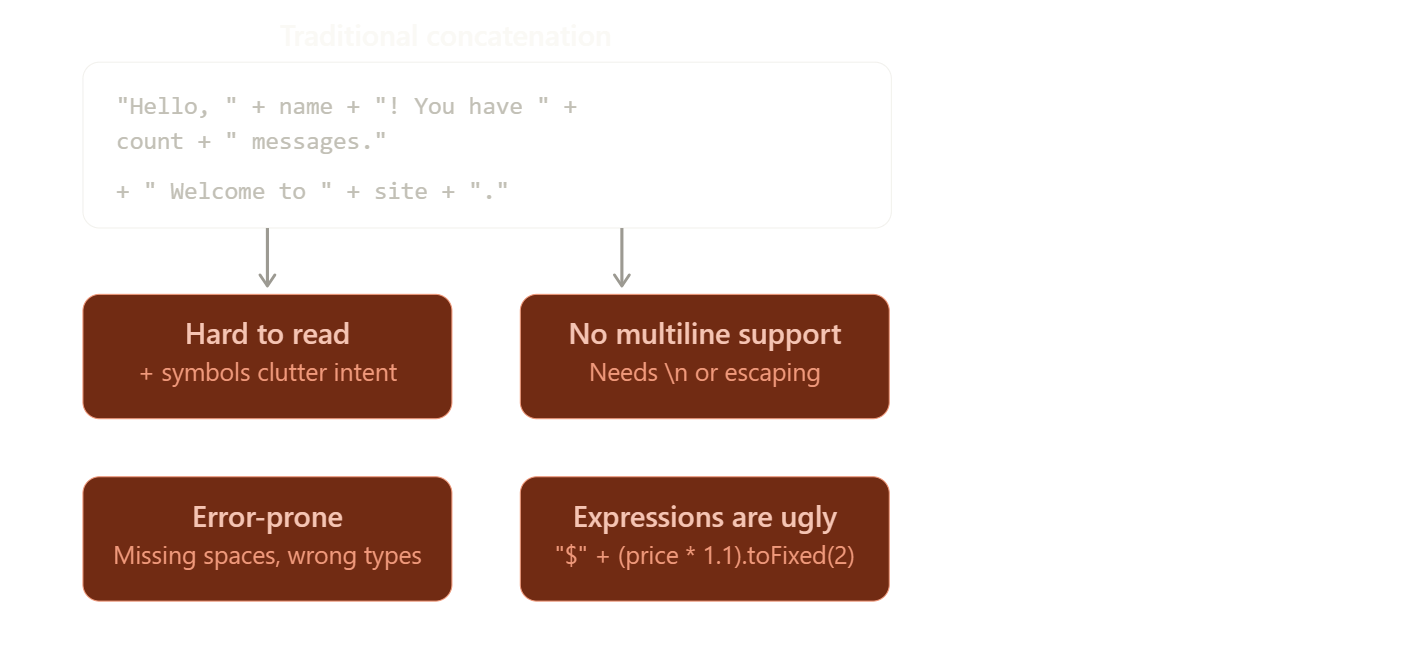
Traditional string building in JavaScript uses the + operator to stitch together string literals and variables. This seems fine at first, but quickly runs into trouble.
Here's what makes concatenation painful in practice:
The Fix: Template Literals
Template literals use backticks (`) instead of quotes and embed variables directly with ${} syntax. This is called string interpolation.
Let's see the before-and-after side by side:
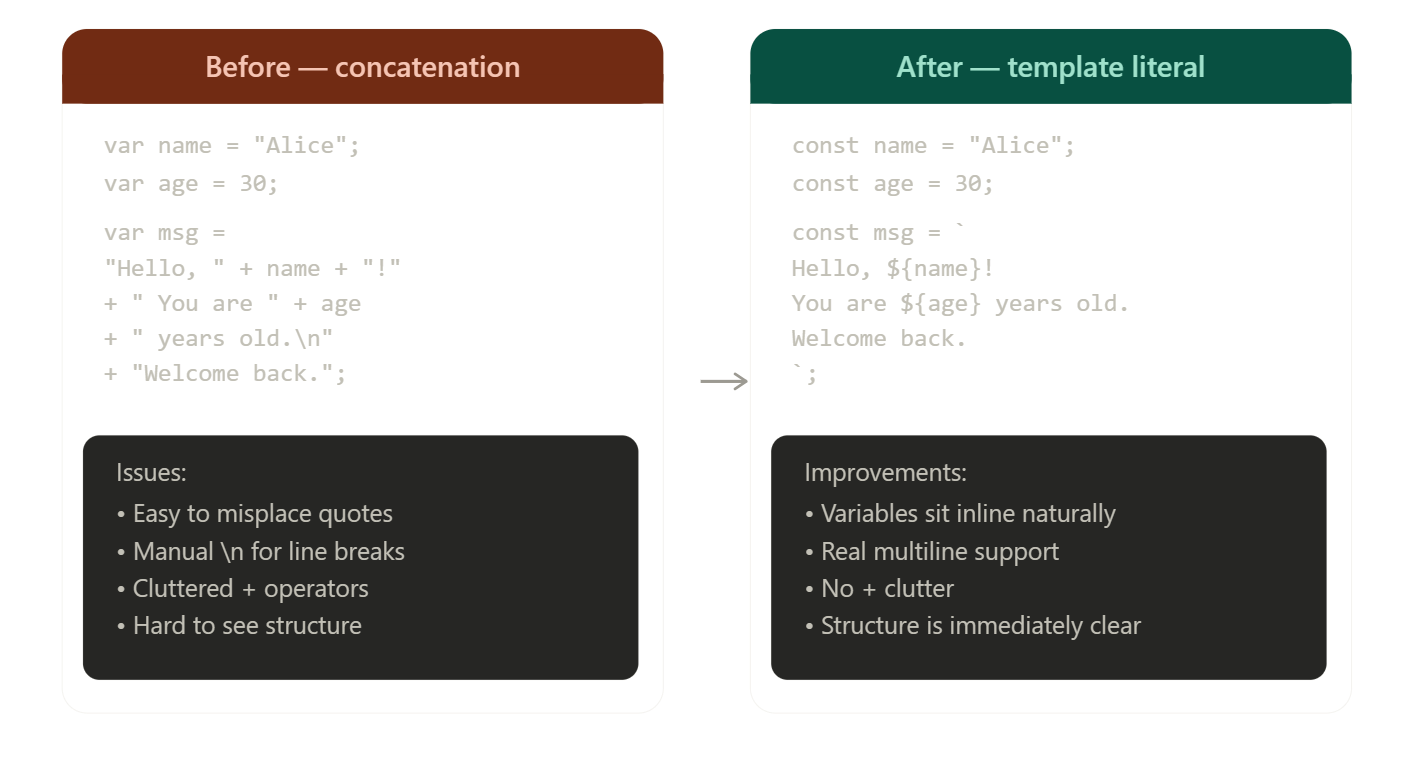
The difference in readability is immediate. The template literal version reads almost like plain English — you can see the structure of the output string without mentally untangling operators.
How String Interpolation Works
When JavaScript encounters a template literal, it evaluates every ${} expression and splices the result directly into the string at that position. The expressions can be variables, calculations, or any valid JS expression.
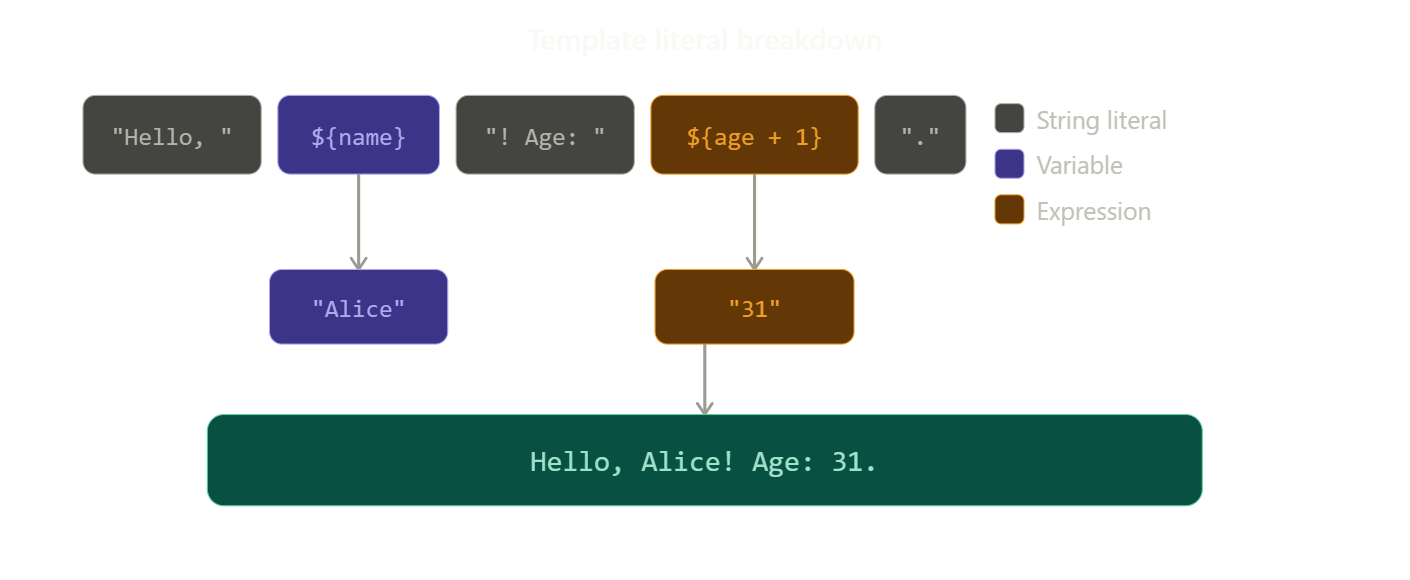
Notice how ${age + 1} evaluates the full expression before inserting the result — template literals aren't just variable slots, they accept any JavaScript expression.
Beyond Variables: What Template Literals Can Do
Template literals handle several scenarios that concatenation handles awkwardly:
Multiline strings — no more \n:
const html = `
  <div class="card">
    <h2>${title}</h2>
    <p>${body}</p>
  </div>
`;
Expressions and logic — calculations, ternaries, function calls:
const list = items.map(i => <li>\({i.name}</li>).join(''); const page = <ul>\){list}</ul>;
The Readability Difference at a Glance
The single biggest benefit is how much easier template literals are to scan. Here's a real-world HTML-building example:
// Old way
var card = ' <div> class="card" id="' + id + '">'
    + '<h2>' + title + '<h2>'
    + '<p>'  + desc + '</p>'
    + '</div>

// New Way
const card = `
    <div class ="card" id="${id}">
        <h2>${title}</h2>
        <p>${desc}</p>
    </div>
`;
The structure of the HTML is completely visible in the template literal version. In the concatenation version, the HTML is buried in noise.
When to Still Use Regular Strings
Template literals aren't a universal replacement. Plain quotes are still fine for static strings with no variables — const label = "Submit" is cleaner than const label = Submit. The rule of thumb: reach for template literals the moment a variable or expression enters the string.
Summary
Traditional string concatenation works, but it fights readability as complexity grows. Template literals bring three concrete improvements: interpolation (variables sit naturally inside the string), multiline support (no escaping required), and expression evaluation (full JS expressions, not just variables). For any string that involves dynamic content, template literals are the cleaner, safer choice — and a pattern you'll want as your default.
2. Template literal syntax
Template Literal Syntax: A Complete Guide
JavaScript ES6 introduced template literals as a modern replacement for string concatenation. Understanding the syntax deeply — not just that it "uses backticks" — unlocks everything from clean variable injection to multiline HTML and dynamic expressions.
Anatomy of a Template Literal
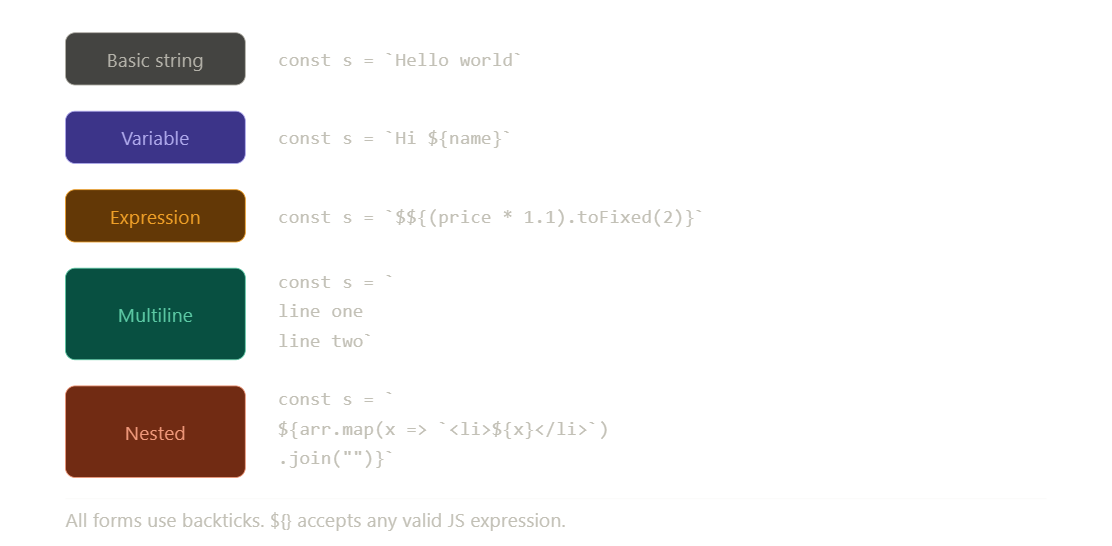
A template literal has three distinct components. Before writing a single line of code, it helps to see what each part is doing.
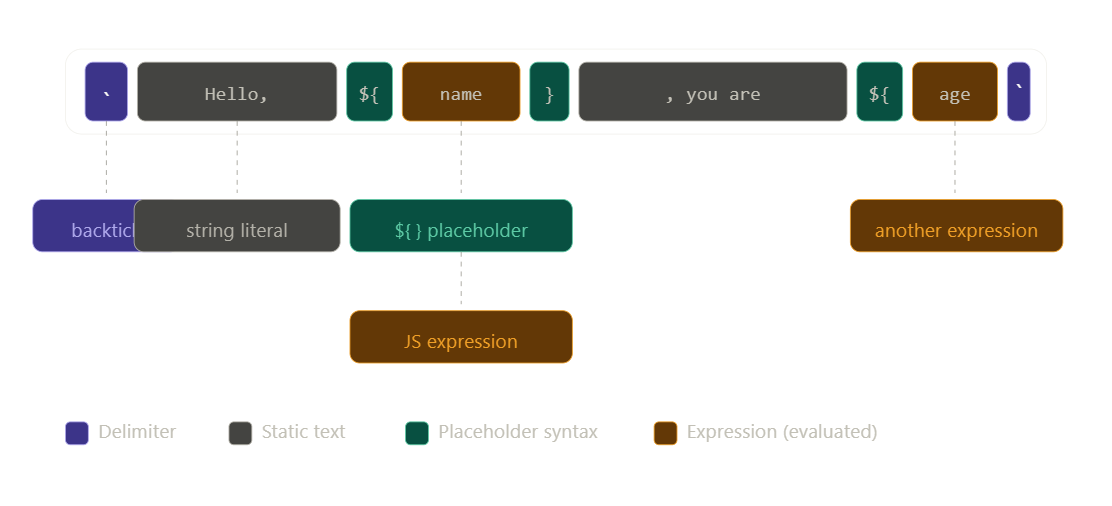
The three building blocks are: the backtick delimiters that open and close the string, the static text segments that appear as-is, and the ${ } placeholders that evaluate any JavaScript expression and splice the result inline.
Before vs. After: Side by Side
The readability improvement becomes most obvious when you compare both syntaxes at the same task. Click any card to explore it further.
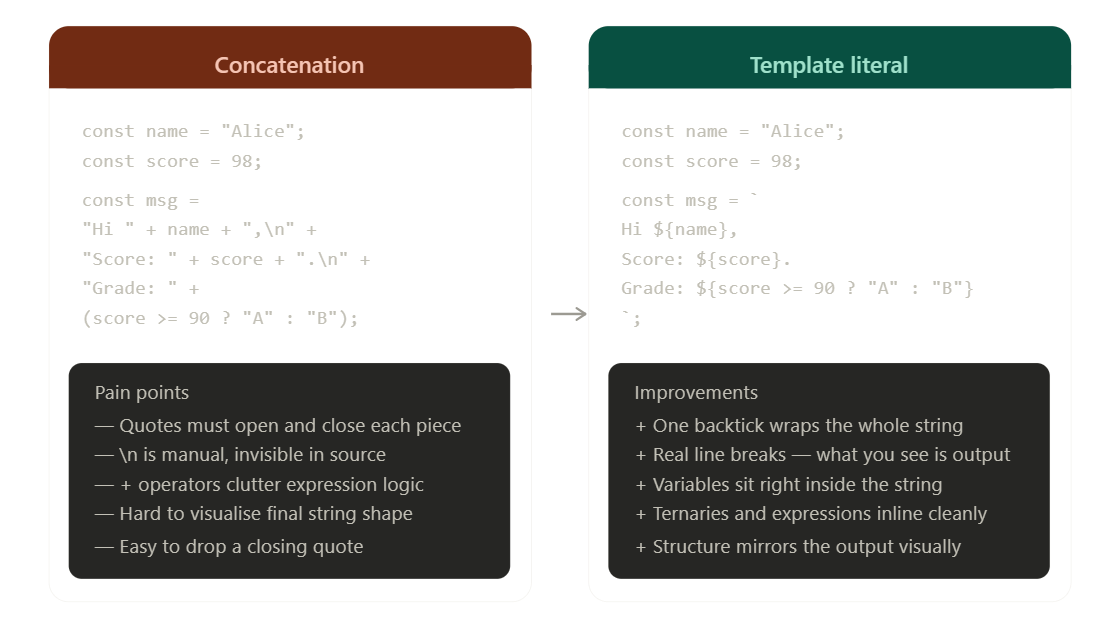
Notice how the template literal version mirrors what the actual output string will look like — there's no mental translation required. The structure you write is the structure you get.
What ${ } Can Hold
The placeholder ${ } isn't limited to simple variable names. It evaluates any valid JavaScript expression. Here's an interactive breakdown of what you can place inside:
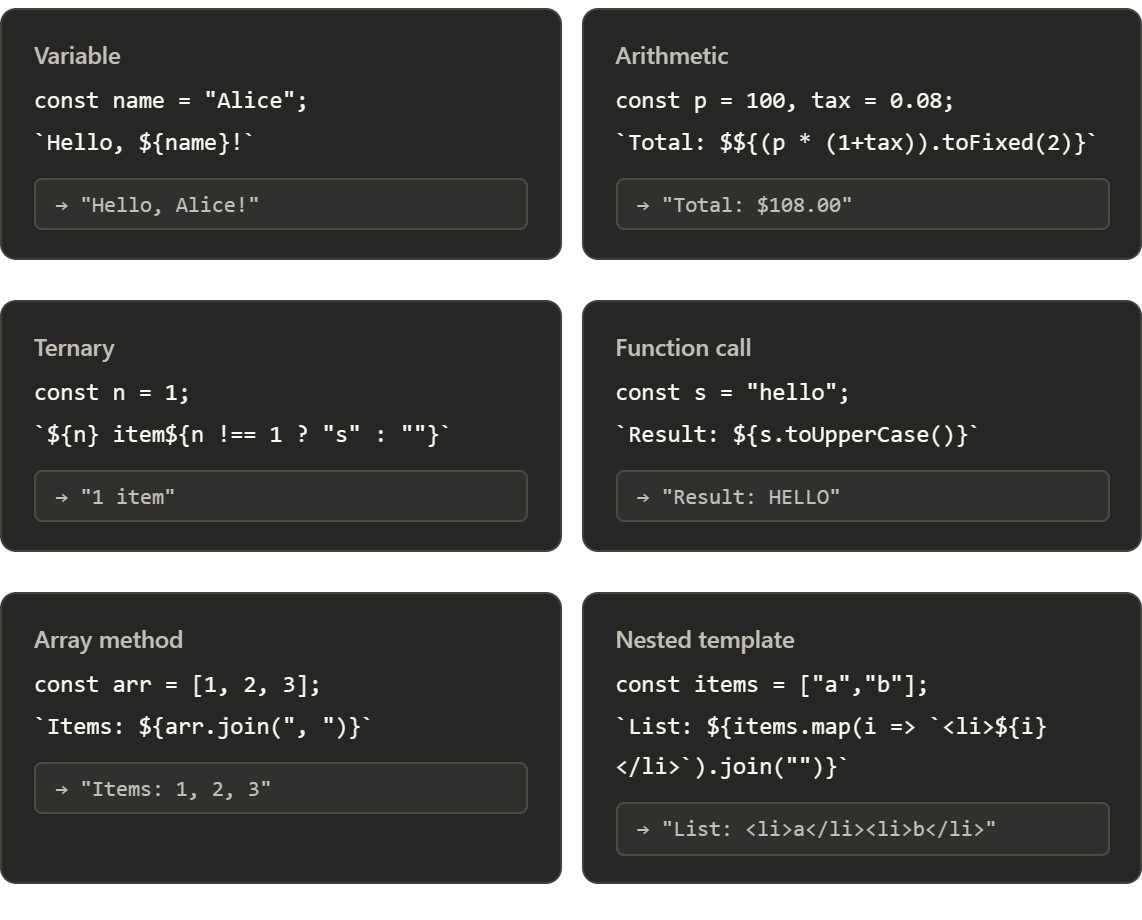
Each ${ } is a full JavaScript execution context — not just a variable slot. Calculations, method calls, ternaries, and even nested template literals all work inside it.
Multiline: The Hidden Superpower
One of the most overlooked syntax features is how template literals handle line breaks. In concatenation, you manually inject \n. With template literals, pressing Enter inside the backticks is the newline.
// Old way — newlines must be explicitly escaped
const html = "<div>\n" +
             "  <h1>" + title + "</h1>\n" +
             "  <p>" + body + "</p>\n" +
             "</div>";

// New way — the indentation you write is the indentation you get
const html = `
  <div>
    <h1>${title}</h1>
    <p>${body}</p>
  </div>
`;
This makes template literals the natural choice for building HTML strings, SQL queries, multiline messages, and any output where structure matters.
Key Syntax Rules to Remember
There are a few small syntax details that trip people up when switching from concatenation:
Backticks, not quotes. Template literals use ` (the key above Tab). Single and double quotes still work for static strings — just not for template literals.
${ } is the only interpolation syntax. Unlike some other languages, there's no #{} or %s — it's always dollar-sign curly-brace.
Expressions are evaluated immediately. Whatever is inside ${ } runs when the string is assigned. There is no deferred evaluation unless you wrap it in a function (that's called a tagged template, a more advanced feature).
Backticks inside the string must be escaped. If you need a literal backtick character in your string, escape it: He said \hello\ ``.
Whitespace is literal. Leading spaces and newlines inside your template are part of the string. If you indent the closing backtick, that indentation is included in the output.
Summary
Template literal syntax swaps quotes for backticks and replaces + operators with ${ } placeholders. Variables slot directly into the string, expressions evaluate inline, and line breaks in your source become line breaks in the output. It's a small syntax change with a large readability payoff — and once you start using it, going back to concatenation feels like writing by hand with an oven mitt.
3. Embedding variables in strings
Embedding Variables & Multi-line Strings in JavaScript
Two of the most common everyday tasks in JavaScript are injecting dynamic values into strings and writing strings that span multiple lines. Template literals transform both from awkward workarounds into natural, readable code. Let's look at each one in depth.
Part 1: Embedding Variables in Strings
Before template literals, getting a variable's value into a string meant breaking out of the string, concatenating, and re-entering it. For a single variable that's tolerable — for three or four, it becomes a puzzle.
Here's what that friction looks like at scale:
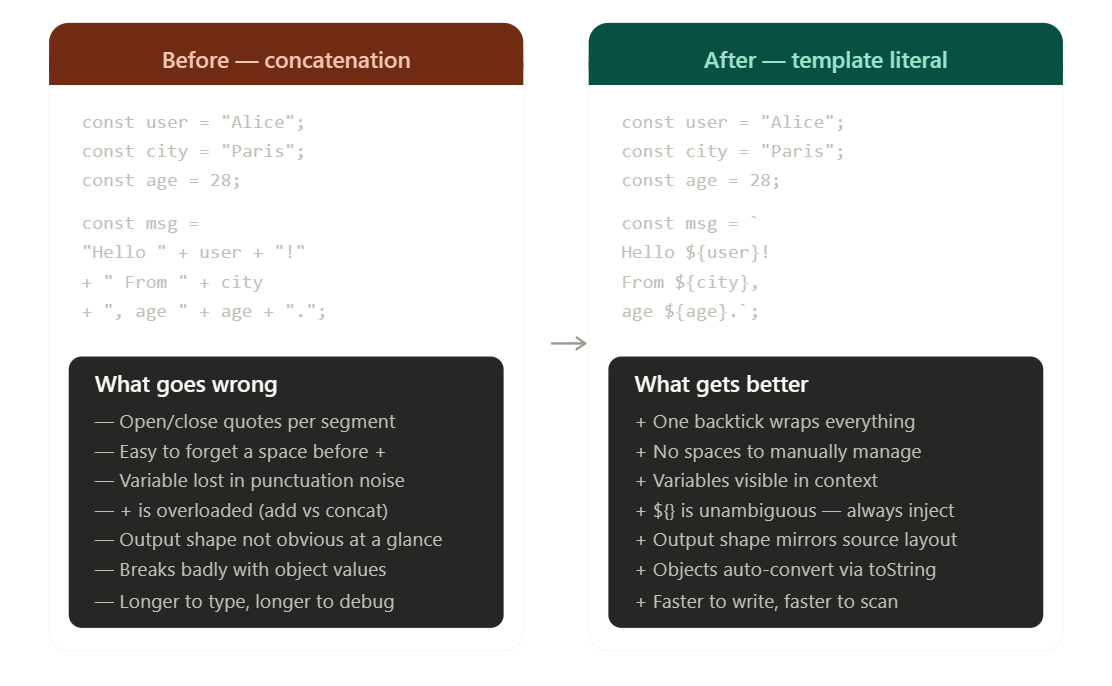
The difference isn't just aesthetic. With concatenation, the mental load is split between tracking quote pairs, managing spaces around +, and reading the variable name buried between punctuation. Template literals collapse that into a single concern: what does the string say?
How Interpolation Actually Works
When JavaScript evaluates a template literal, it walks through each ${ } placeholder in order, evaluates the expression inside, converts the result to a string, and splices it into the surrounding text. The whole thing resolves into a single string value — exactly as if you'd written it out by hand.
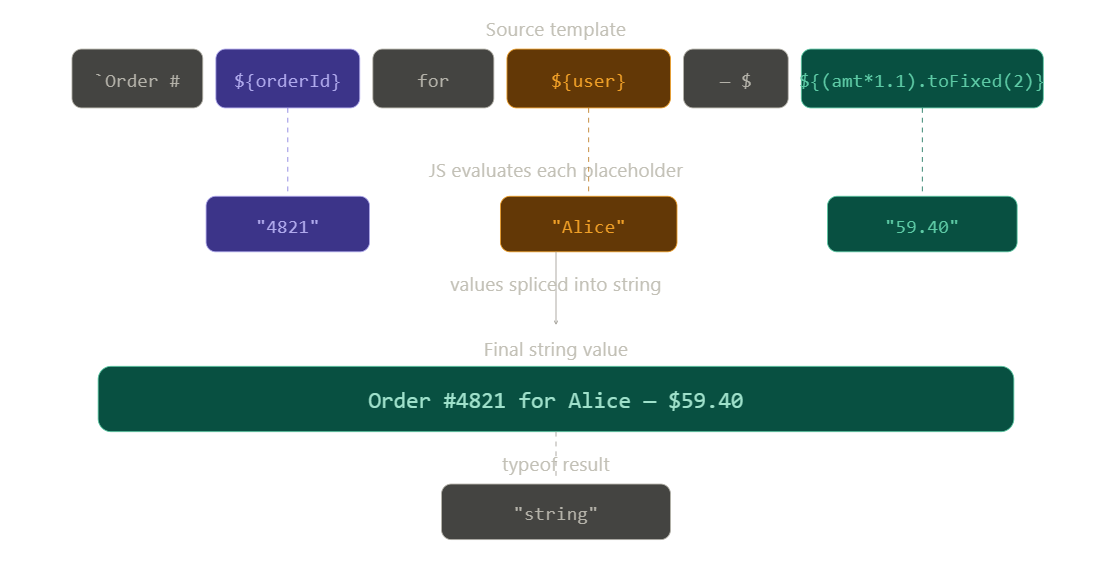
Each placeholder — whether a variable, a calculation, or a method call — gets evaluated, converted to a string, and inserted in-place. The result is always a plain string, indistinguishable from one you'd written by hand.
Part 2: Multi-line Strings
Multi-line output was one of JavaScript's most persistent annoyances before ES6. The only options were manual \n escapes, array-join tricks, or awkward string continuation. Template literals make it disappear entirely.
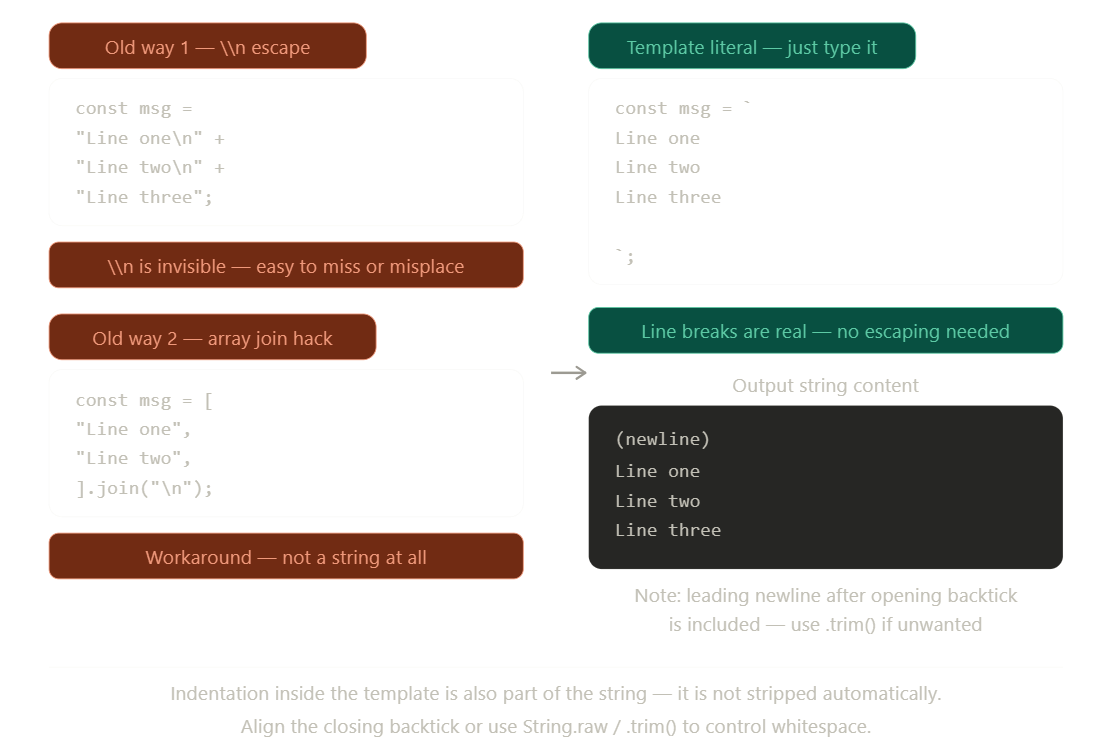
There's one thing worth watching: because the string starts immediately after the opening backtick, pressing Enter after the backtick adds a leading newline to your string. Use .trim() on the result if you don't want it.
Multi-line + Variables Together
The real power emerges when you combine both features. This is where template literals shine most for practical tasks like building HTML, constructing API payloads, or generating email content.
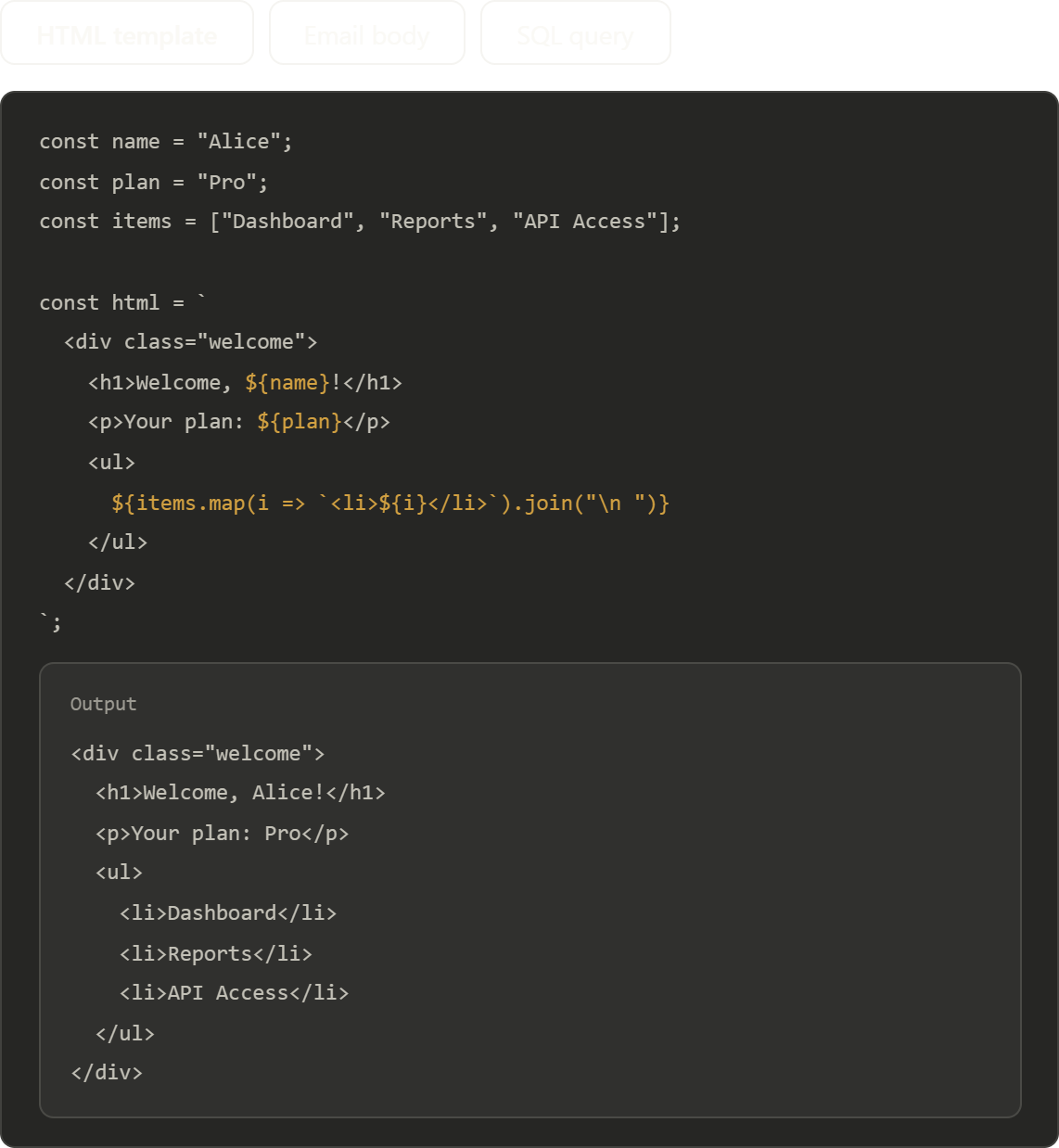
In each case, the template literal lets you write the output format directly — the code structure mirrors what the output looks like. This is impossible with concatenation once the string spans more than two lines.
One Whitespace Gotcha to Know
Template literals preserve all whitespace literally — including the indentation you add to align the code nicely in your editor. This is usually fine, but occasionally bites you when building strings that will be compared or logged.
function greet(name) {
  return `
    Hello, ${name}.
    Welcome back.
  `;
}

console.log(greet("Alice"));
// Output includes the leading newline and 4-space indent on each line
If you want a clean string without leading/trailing whitespace, chain .trim():
return `
  Hello, ${name}.
  Welcome back.
`.trim();
// → "Hello, Alice.\n  Welcome back."
Embedding variables in strings is now a single gesture — wrap the string in backticks and drop the variable inside ${ }. Multi-line strings require nothing at all beyond pressing Enter. Together, these two features remove the biggest sources of noise and error from everyday string work in JavaScript. The output you want to produce and the code you write to produce it finally look the same.
3.Multi-line strings
Template literals didn't just fix a syntax annoyance — they unlocked entirely new patterns in how JavaScript developers write and structure dynamic content. Multi-line string support is the foundation, and the use cases built on top of it touch almost every area of modern development.
The Multi-line Problem, Visualized
Before template literals, writing a string across multiple lines required you to either escape newlines manually, concatenate fragments, or use an array join hack. None of these were natural — all three forced you to think about the mechanism of line breaks instead of the content of your string.
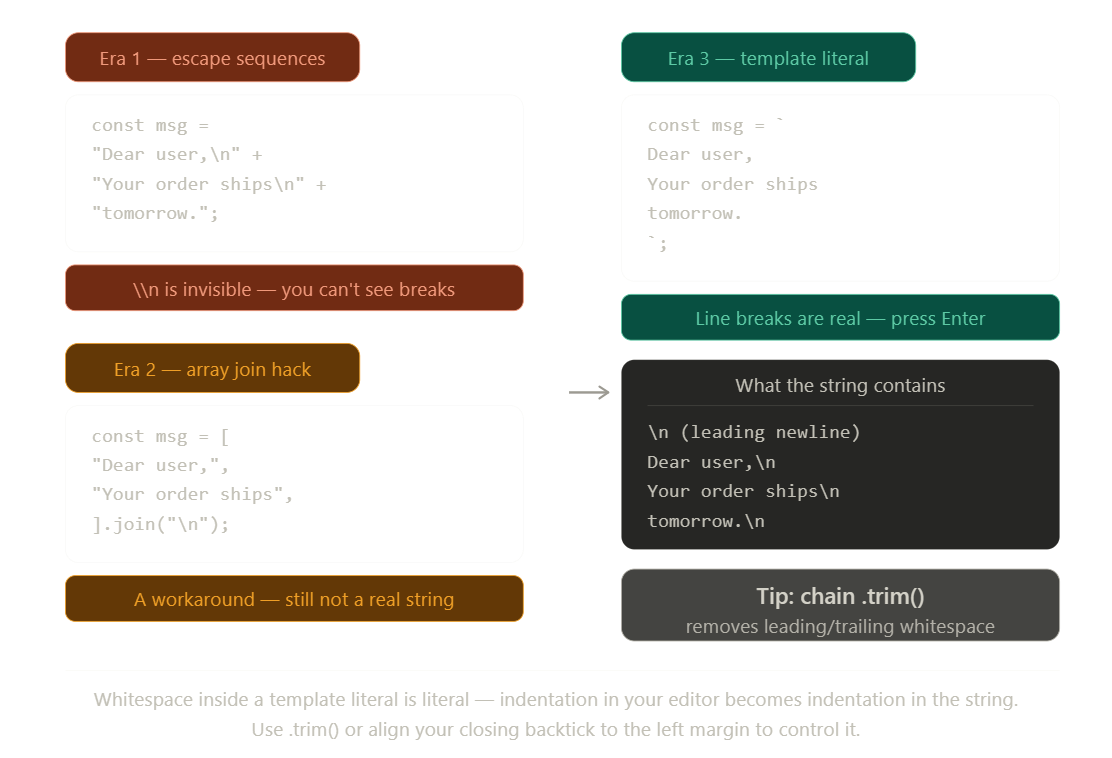
The template literal version is the only one where the visual structure of the code matches the visual structure of the output. Every line in your editor is a line in the string — no translation layer required.
Use Cases in Modern JavaScript
Multi-line strings with variable embedding show up in five places constantly in real codebases. Here's each one with a before/after comparison you can tab through:
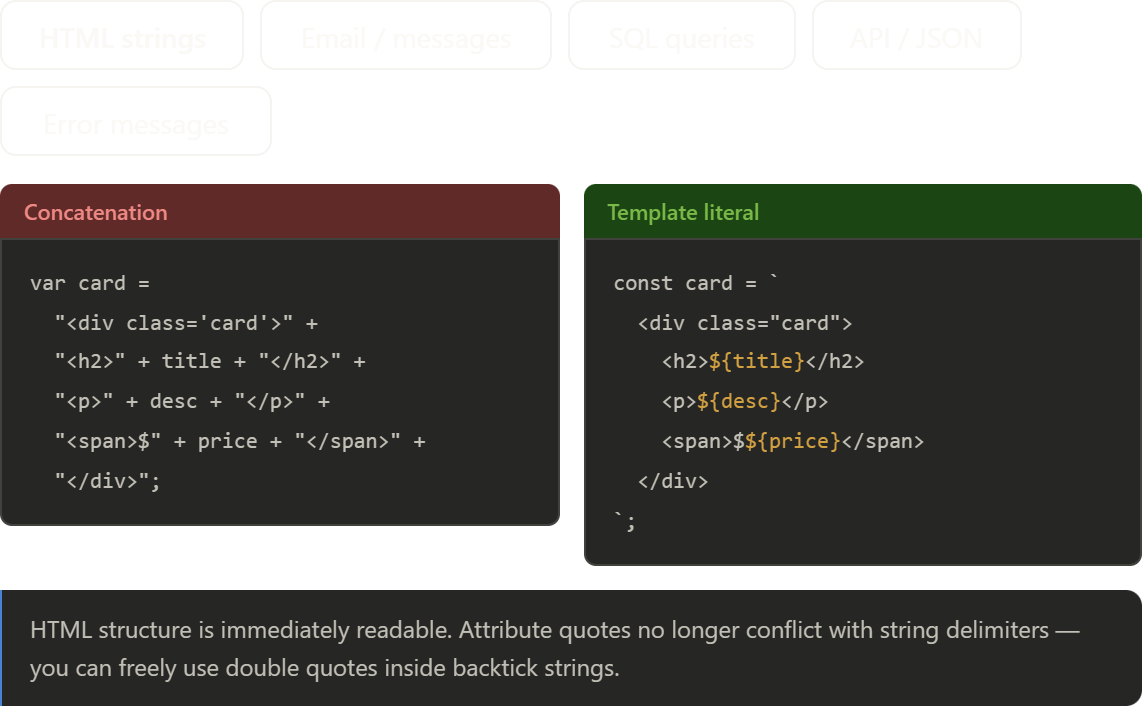
In every case the pattern is the same: the template literal version looks like what you're building, while the concatenation version looks like you're describing the assembly instructions.
The Old Way: String Concatenation
Before ES6, combining strings and variables meant using the + operator. For short strings, it's fine. For anything real-world? It quickly becomes a maintenance nightmare.
// Old-school concatenation
var name = "Alice";
var age = 30;
var city = "Bangalore";

var greeting = "Hello, my name is " + name + ".\n" +
               "I am " + age + " years old.\n" +
               "I live in " + city + ".";
Notice the \n escape characters for line breaks, the fragile quote balancing, and the cognitive load of tracking + operators between every piece. Now scale that to a 10-variable HTML template and it becomes nearly unreadable.
The New Way: Template Literals
Template literals use backticks (`) instead of quotes. They support string interpolation with ${} and native multi-line strings — no escape characters needed.
// ES6 template literals
const name = "Alice";
const age = 30;
const city = "Bangalore";

const greeting = `Hello, my name is ${name}.
I am ${age} years old.
I live in ${city}.`;
Same output. Half the symbols. Infinitely more readable.
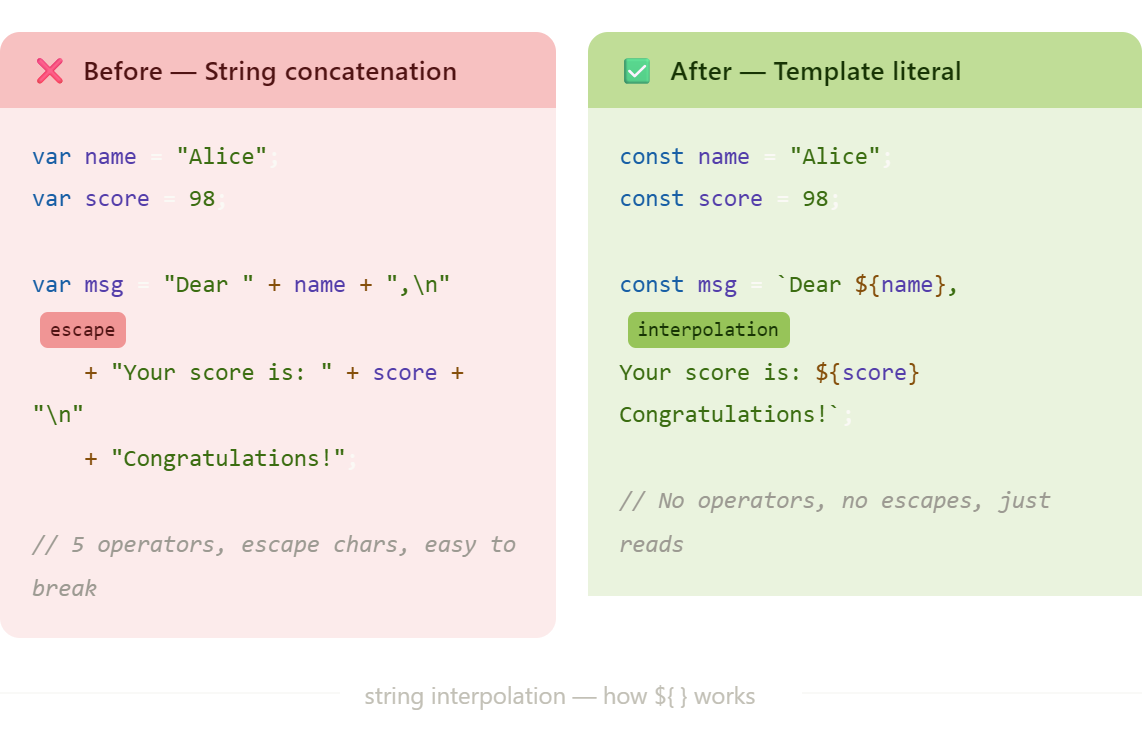
Before vs. After: A Visual Comparison
Here's how the two approaches differ when building a real HTML email template:
How String Interpolation Works
The ${} syntax is the heart of template literals. Here's what happens under the hood:
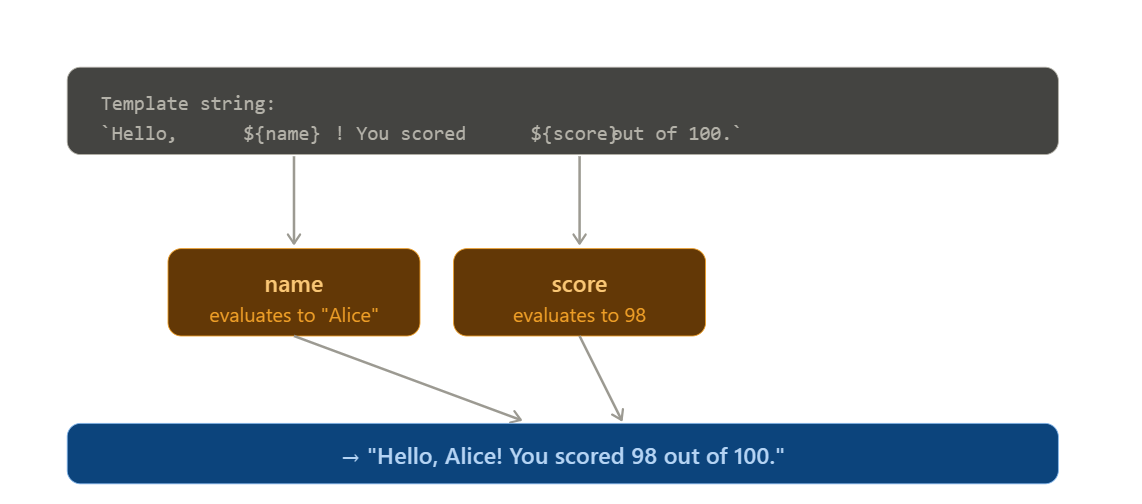
Beyond Variables: Expressions Inside ${}
Template literals don't just accept variables — they evaluate any JavaScript expression.
const a = 5;
const b = 10;

console.log(`sum: ${a + b}`};
console.log(`Is adult: ${age >= 18}`);
console.log(`Upper: $(name.toUpperCase()}`);
This means you can call functions, run ternaries, or even nest template literals inside ${}.
5. Use cases in modern JavaScript
Template Literals in Modern JavaScript: Real-World Use Cases
Template literals aren't just a cleaner way to concatenate strings. In modern JavaScript, they're a foundational tool used across frameworks, APIs, and developer tooling. Here are the use cases that matter most in production code today.
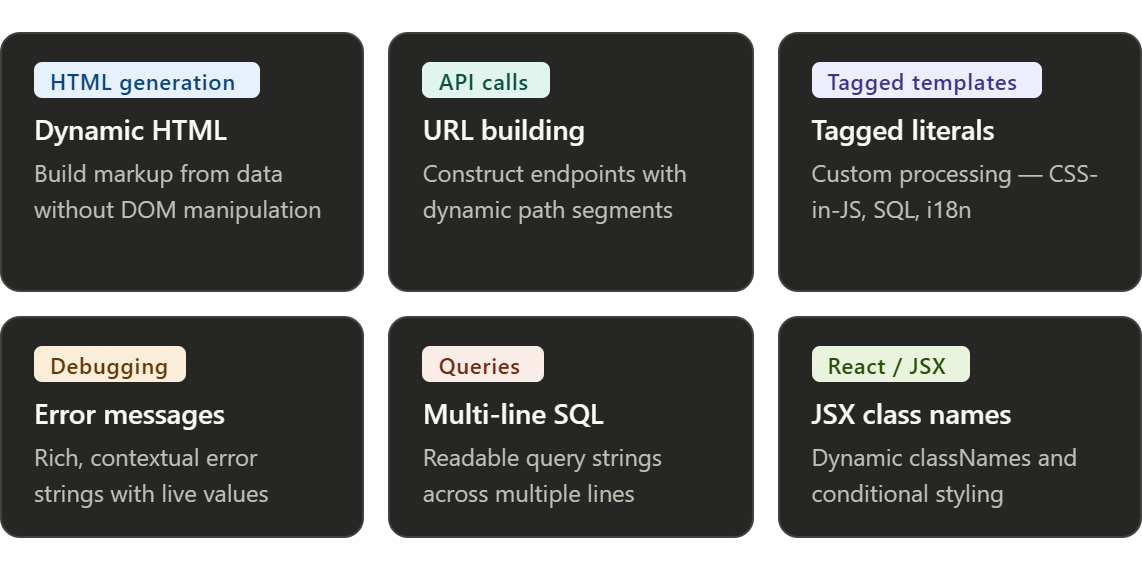
The 6 Core Use Cases
Every use case below solves a real problem that the old string syntax either couldn't handle cleanly or made genuinely error-prone.
1. Dynamic HTML generation
One of the most common uses in frontend JavaScript. Instead of creating DOM nodes one by one, you build the entire markup as a string and inject it.
const products = [
  { name: "Keyboard", price: 2499 },
  { name: "Mouse", price: 899 },
];

const html = `
  <ul class="product-list">
    ${products.map(p => `
      <li class="product-item">
        <span>${p.name}</span>
        <strong>₹${p.price}</strong>
      </li>
    `).join('')}
  </ul>
`;

document.getElementById('app').innerHTML = html;
The key pattern here is nesting template literals inside .map() — each item gets its own template, and .join('') stitches them together without commas.
2. API URL construction
Building URLs with query parameters used to mean either string concatenation chaos or URLSearchParams. Template literals offer a clean middle ground for straightforward cases.
const baseURL = 'https://api.example.com';
const userId = 42;
const page = 3;
// Simple path segments
const endpoint = `\({baseURL}/users/\){userId}/orders?page=${page}`;
// With async/await
const response = await fetch(`\({baseURL}/products/\){productId}`);
const data = await response.json();
3. Tagged template literals — the power user feature
This is where template literals go from convenient to genuinely powerful. A tagged template lets a function intercept and transform the string before it's built.
This is where template literals go from convenient to genuinely powerful. A tagged template lets a function intercept and transform the string before it's built.
function highlight(strings, ...values) {
  return strings.reduce((result, str, i) => {
const val = values[i - 1];
    return result + `<mark>${val}</mark>` + str;
  });
}

const name = "Priya";
const score = 98;
const msg = highlight`Student \({name} scored \){score} marks.`;
// → Student <mark>Priya</mark> scored <mark>98</mark> marks.
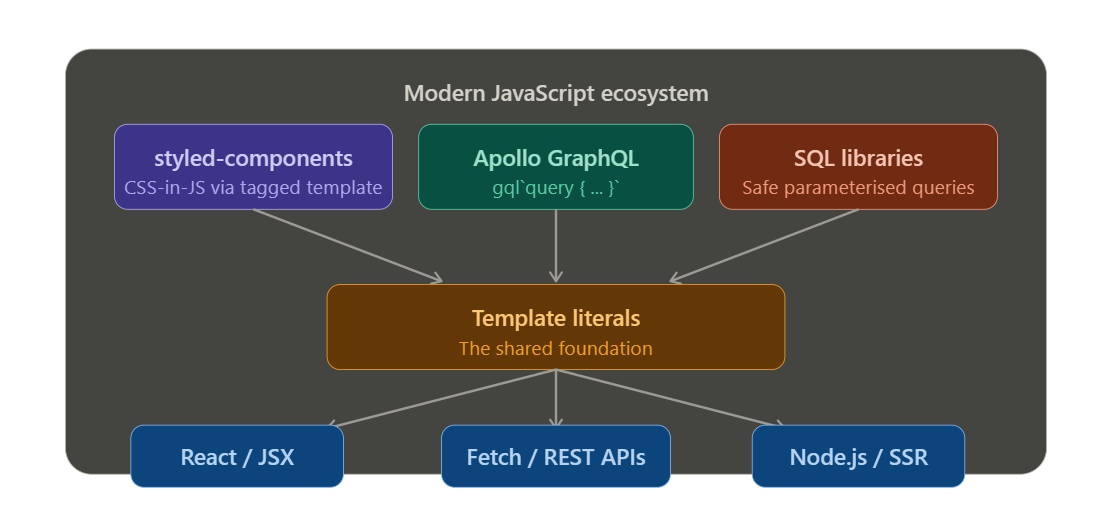
Real-world frameworks lean on this heavily — styled-components uses it for CSS-in-JS, gql from Apollo uses it for GraphQL queries, and sql libraries use it to safely escape query parameters.
The flow of a tagged template literal looks like this:
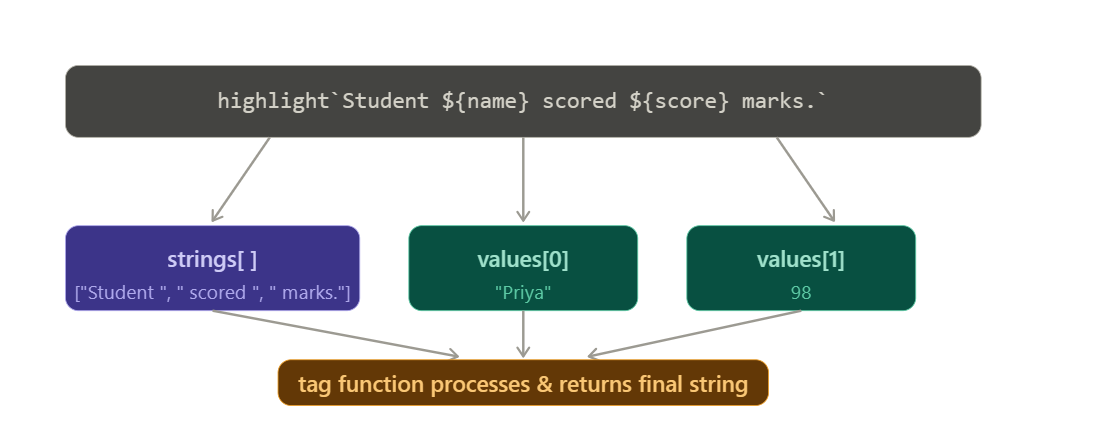
The tag function receives the static string parts and the interpolated values as separate arguments — giving it full control over what gets returned.
4. Rich error messages
Debugging becomes dramatically easier when your error messages include live values rather than generic text.
function getUser(id) {
  if (!id) throw new Error(`getUser() called with invalid id: "${id}"`);
  if (typeof id !== 'number') {
  throw new TypeError(
      `Expected id to be a number, got \({typeof id} — received: \){JSON.stringify(id)}`
    );
  }
}
Compared to "Expected id to be a number, got " + typeof id, this version is instantly more debuggable and requires zero mental parsing.
5. Multi-line SQL queries
Database queries written as concatenated strings are nearly impossible to read or maintain. Template literals make SQL look like SQL again.
const getOrders = async (userId, status) => {
  const query = `
    SELECT o.id, o.total, o.created_at, u.name
    FROM orders o
    JOIN users u ON u.id = o.user_id
    WHERE o.user_id = ${userId}
      AND o.status = '${status}'
    ORDER BY o.created_at DESC
    LIMIT 50
  `;
  return await db.query(query);
};
Note: For user-provided values, always use parameterised queries or a tagged template SQL library (like sql-template-strings) to prevent SQL injection. Never interpolate raw user input directly.
6. Dynamic class names in React / JSX
Inside JSX, you can't use if blocks inline — but you can embed any expression inside ${}, which makes conditional class names clean and readable.
const Button = ({ variant, disabled, children }) => (
  <button
    className={`btn btn--\({variant} \){disabled ? 'btn--disabled' : ''}`}
    disabled={disabled}
  >
    {children}
  </button>
);
const Card = ({ isActive, isPremium }) => (
  <div className={`card \({isActive ? 'card--active' : ''} \){isPremium ? 'card--premium' : ''}`}>
    ...
  </div>
);
For more complex conditional class scenarios, libraries like clsx or classnames build on this exact pattern.
Where template literals fit in the modern JS stack